How to Unblock UPI ID: A Step-by-Step Guide

A blocked UPI ID can feel like everything has come to a sudden stop, especially when you need to pay a bill or send money at that exact moment.
We panic as an interruption creates uncertainty and a worry that something might be wrong with our accounts.
The truth is much simpler.
Most UPI blockages are temporary restrictions triggered by security checks that protect your transactions. Let's find out how to unblock your UPI ID, understand the cause, and restore smooth payments with complete confidence.
Why Does Your UPI ID Get Blocked?
A UPI block rarely happens without a reason. Understanding the cause makes the unblocking process much easier and helps you avoid the same issue in the future.
Many users search for how to unblock their UPI ID right after their transaction fails, but the problem usually links back to a few predictable triggers.
These triggers are monitored by your bank and NPCI to keep your payments safe. Once you know what caused the block, you can fix it quickly through your UPI app settings or through identity verification.
Common reasons include -
- Multiple incorrect UPI PIN attempts
- Suspicious or unusual account activity
- Issues with the linked bank account
- App or server problems during a transaction
- Security flags raised by the bank or NPCI
Also Read - UPI Transaction Limits: What Borrowers Should Know Before Paying EMIs
Prerequisites Before Unblocking Your UPI ID
Most UPI apps follow a similar verification flow. Therefore, prepare the essentials that the app or bank may request during verification so that the app recognises your identity correctly and prevents repeated failures.
Checklist of What You Need
- Mobile number registered with your bank and active on the same device
- Uninterrupted internet connection for fast OTP delivery or security checks
- Debit card details, if the app requests them during a PIN reset flow
- Login credentials for the UPI app, along with basic KYC information that confirms your identity
Step-by-Step Process to Unblock Your UPI ID
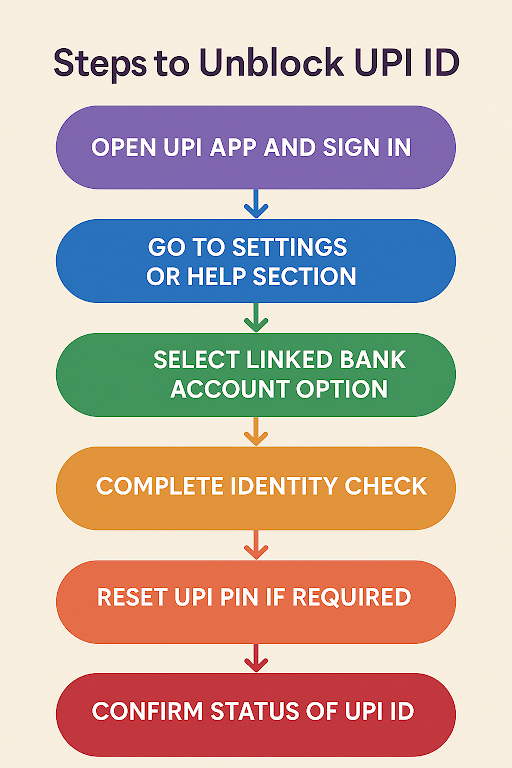
Each UPI platform follows a similar structure because the verification rules come from your bank and the NPCI. What changes slightly is the menu placement and the way each app labels its settings.
Here's a step-by-step guide to unblock your UPI ID -
Step 1 - Open your UPI app and sign in with your registered mobile number to allow the system to confirm device ownership.
Step 2 - Go to the settings or help section where options related to bank accounts, payment methods, and security are listed together.
Step 3 - Select the option that manages your linked bank account and look for the unblock or reactivate choice shown on most UPI menus.
Step 4 - Depending on the app's requirement, you need to verify your identity using debit card details, OTP verification, or device confirmation.
Step 5 - If the app asks, reset your UPI PIN so that the system can refresh your credentials and remove the security lock.
Step 6 - Attempt a small test payment or check the account information page to confirm the status of your UPI ID.
If you face repeated security blocks, avoid unknown links or unofficial portals and rely only on app-guided steps published by banks and the NPCI. These official verification methods protect your account from unauthorised activity and ensure that every step follows standard digital safety protocols.
Also Read: What is a UPI PIN, and How to Create and Change a UPI PIN?
Unblocking Your UPI ID on Popular UPI Apps
Different apps follow the same UPI rules but present the options in slightly different places. These steps help you locate the right menu quickly and complete the unblocking process without confusion.
Google Pay
- Open Google Pay and go to your profile.
- Select payment methods and choose the affected bank account.
- Tap the three-dot menu and select the option to reset or unblock UPI.
- Verify using OTP and confirm activation.
PhonePe
- Open the app and visit the profile section.
- Select bank accounts and choose the account with the blocked UPI ID.
- Tap on the reset option and verify through OTP.
- Create a new PIN if required.
Paytm
- Open Paytm and go to the UPI and bank accounts section.
- Select the linked account and choose reset UPI PIN or unblock UPI.
- Enter the debit card details and verify with OTP.
- Confirm successful activation.
Also Read: How to Unlink UPI from Your Bank Account:
Bajaj Finserv App
- Open the app and navigate to UPI settings.
- Choose the linked bank and select unblock or reset UPI ID.
- Verify identity and confirm the updated status.
Also Read - How to Change and Reset UPI PIN?
Tips to Avoid Future UPI ID Blockages
Many users look for how to unblock UPI ID or how to unblock UPI only after the problem appears, but a little awareness keeps your payments safe and active at all times.
These habits also help the bank and NPCI recognise your identity quickly and reduce the chances of security flags. Each tip is practical, easy to follow, and designed to keep your UPI access stable across all major apps.
Smart habits to follow
- Memorise your PIN and never keep any written reminders
- Keep your PIN and OTP confidential at all times. No authorised financial institution asks for them.
- Watch out for phishing links and fake support calls.
- Update your app and device regularly.
- Review your UPI activity to spot unusual transactions early.
Also Read - Is UPI Safe? Security Features Every User Should Know
Your UPI Is Active Again. Here Is Your Next Step
A blocked UPI ID can feel overwhelming in the moment, yet the solution is almost always simpler than it seems. Once you understand the cause and follow the right steps, your payments return to normal within minutes.
The real win comes from staying prepared, recognising security prompts, and trusting the official settings inside your app. These habits keep your UPI activity smooth, predictable, and safe.
If the blockage affects an urgent payment and you need quick access to funds, you can apply for a personal loan from Hero FinCorp. The process is simple, paperless, and created for users who need reliable support during sudden financial interruptions.
FAQs (Frequently Asked Questions)
How long does it take to unblock a UPI ID?
Once you complete the verification or PIN reset process, it will take a few minutes to unblock.
Are there any charges for unblocking a UPI ID?
No. UPI unblocking is free across all major banks and apps.
What happens if my UPI ID remains blocked after all attempts?
You can contact your bank’s customer support or raise a complaint on the NPCI portal for further verification.
How do I reset my UPI PIN if my UPI is blocked?
Follow these steps to reset your UPI PIN: Open your UPI app → Select your bank account → Use the reset PIN option with debit card and OTP verification.
Can I block or freeze my UPI ID if my phone is lost or stolen?
Yes. You can contact your bank or use the official UPI app website to temporarily freeze transactions.
Disclaimer: The information provided in this blog post is intended for informational purposes only. The content is based on research and opinions available at the time of writing. While we strive to ensure accuracy, we do not claim to be exhaustive or definitive. Readers are advised to independently verify any details mentioned here, such as specifications, features, and availability, before making any decisions. Hero FinCorp does not take responsibility for any discrepancies, inaccuracies, or changes that may occur after the publication of this blog. The choice to rely on the information presented herein is at the reader's discretion, and we recommend consulting official sources and experts for the most up-to-date and accurate information about the featured products.