How to Unlink UPI from Your Bank Account: A Complete Step-by-Step Guide

- Why You Might Need to Disable UPI from Your Bank Account
- How to Unlink UPI from a Bank Account on Different Apps
- How to Disable UPI from Bank Account via Net Banking or a Bank Branch
- Important Things to Check Before Unlinking
- Take Control of Your UPI Settings for Safer Digital Banking
- Frequently Asked Questions
UPI has truly revolutionised our lives in terms of money management. It has made payments, transfers, and bill settlements so fast and easy that it has taken away all the hassle.
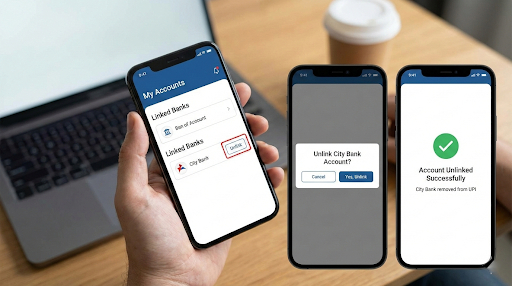
However, at times, you might feel the need to have more control over your linked bank accounts. Knowing how to unlink UPI from a bank account helps you protect your money, resolve technical issues, or switch banks without complications.
Today, smart financial management goes beyond just payments. Many users pair UPI with dependable digital lending solutions.
An efficientInstant Loan App guarantees that you will get funds quickly in case of need, thus keeping you financially ready and able to manage your everyday transactions without a hitch.
Why You Might Need to Disable UPI from Your Bank Account
There are several reasons why understanding how to disable UPI from a bank account is important.
- Security is the most important factor. For example, if your phone is stolen or lost, you should immediately disable UPI access to prevent unauthorised transactions and secure your money.
- Another typical reason is changing banks. Having multiple or deactivated bank accounts connected to one UPI ID can lead to issues in case of refunds, failed transactions, or when you want to check your balance. Technical issues such as repeated transaction failures or “multiple bank account” errors can often be resolved by disabling UPI access for unused accounts.
Even if everything appears to be working smoothly, keeping your UPI app organised improves usability and reduces risk. With India processing over 12 billion UPI transactions each month, maintaining full control over your accounts is essential. Many financially savvy users also rely on a trusted loan app to maintain liquidity during emergencies without disrupting regular payments.
How to Unlink UPI from a Bank Account on Different Apps
The majority of UPI-enabled applications provide the feature to unlink a bank account from the app itself. Although there might be minor differences in the menu, the operation is usually quite fast and simple. Make sure your app is the latest version and that your mobile number is registered with the bank to receive the OTP before proceeding.
Unlinking from Google Pay (GPay)
If you have a GPay account and you want to unlink your UPI ID from your bank, you should follow these steps:
- Open Google Pay and tap your profile icon in the top-right corner.
- Select Bank Accounts to view all linked accounts.
- Choose the account you want to remove.
- Tap the three-dot menu and select Remove Account.
- Complete the verification process. Once done, the account will no longer appear in your payment options.
Unlinking from PhonePe
Unlinking your UPI ID from PhonePe is quite similar to that of GPay. Just follow these steps to unlink your bank account quickly:
- Open the PhonePe app and tap your profile icon in the top-left corner.
- Go to Payment Methods and select Bank Accounts.
- Choose the bank account you want to unlink.
- Tap Unlink Bank Account and confirm. The account is removed instantly.
Unlinking from Paytm
Unlinking from Paytm is quite easy. Follow these simple steps to get the work done quickly:
- Tap your profile picture and go to UPI & Payment Settings.
- Select UPI Linked Bank Accounts.
- Choose the account and tap Remove Account.
- Complete verification if prompted.
Managing your UPI setup properly makes payments smoother—especially when paired with fast digital funding options like Hero FinCorp’s Quick Loan App, which offers instant access to funds without paperwork.
How to Disable UPI Using the BHIM App
If you are specifically looking for how to disable UPI from a bank account using an official government-backed platform, the BHIM app offers a simple solution.
- Open the BHIM app and go to Bank Account.
- Select the bank account you want to remove.
- Tap Remove or Deregister and confirm.
This method disables UPI access for the selected account and reduces the risk of unauthorised transactions. Keeping only essential accounts active allows you to manage your digital payments with greater confidence.
How to Disable UPI from Bank Account via Net Banking or a Bank Branch
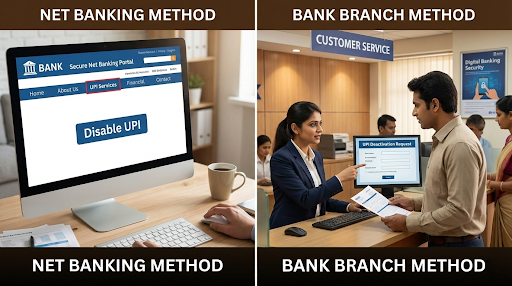
If you cannot remove your account through a UPI app, most banks allow you to disable UPI via net banking. Look for options such as UPI Settings or Third-Party Services, where you can deactivate UPI access securely.
In case your phone or SIM card is lost, contacting your bank’s customer care immediately is the fastest way to block UPI access.
Also Read: How to Unblock UPI ID: A Step-by-Step Guide
Important Things to Check Before Unlinking
- Ensure there are no pending or in-process transactions. Unlinking a bank account during an active transaction can lead to payment delays or failures.
- Check for active mandates such as SIPs, subscriptions, utility bill payments, or insurance premiums linked to the UPI ID, and cancel them if required.
- If you plan to continue using UPI, set another bank account as the primary account before unlinking.
- This ensures uninterrupted payments, refunds, and transfers.
- A well-managed UPI setup, along with instant access to credit, helps maintain smooth transactions and financial security at all times.
Take Control of Your UPI Settings for Safer Digital Banking
Understanding the methods for removing the link between UPI and a bank account, as well as turning off UPI on a bank account, helps secure and smooth digital banking. Be it resolving tech issues, changing banks, or securing accounts, these procedures empower you with full authority over your digital transactions.
And when financial needs arise, speed matters. Hero FinCorp offers fast, secure, and paperless access to funds whenever you need them. Smart UPI management, along with efficient digital lending solutions, can give you absolute control over your financial future, no matter where or when.
Frequently Asked Questions
Does unlinking a bank account delete transaction history?
No, your transaction history remains available even after the account is unlinked.
Can the same bank account be linked again?
Yes, you can relink the account at any time using your registered mobile number.
Is unlinking the same as deregistering UPI?
No, unlinking removes only one bank account, while deregistering disables UPI entirely.
How do you disable UPI if your SIM is lost?
Contact your bank immediately to block UPI access.
Will unlinking stop auto-debits?
No, active mandates must be cancelled separately.
Does unlinking close the bank account?
No, only UPI access is removed. The bank account remains active.
Is there any charge for unlinking or disabling UPI?
No, this service is completely free.
Disclaimer: The information provided in this blog post is intended for informational purposes only. The content is based on research and opinions available at the time of writing. While we strive to ensure accuracy, we do not claim to be exhaustive or definitive. Readers are advised to independently verify any details mentioned here, such as specifications, features, and availability, before making any decisions. Hero FinCorp does not take responsibility for any discrepancies, inaccuracies, or changes that may occur after the publication of this blog. The choice to rely on the information presented herein is at the reader's discretion, and we recommend consulting official sources and experts for the most up-to-date and accurate information about the featured products.