What Is NEFT and How Does It Work?

NEFT makes it simple to send money to a family member or pay a vendor without visiting a bank branch. NEFT, operated by the Reserve Bank of India, enables secure money transfers between bank accounts that support it.
With transactions processed in half-hourly batches and availability through both online and offline channels, NEFT offers a convenient and reliable solution for low- to mid-value money transfers.
Let’s find out what NEFT is, how it works, and how you can initiate transactions using NEFT.
What Is NEFT?
NEFT, National Electronic Funds Transfer, is an electronic payment system that helps you transfer funds between NEFT-enabled bank accounts. The payment is processed every half hour throughout the day.
Since November 2005, the RBI has operated the system to provide a reliable and secure method for transferring money without visiting a branch. It is ideal for transferring low- to mid-value amounts that are not time-sensitive, as it uses deferred settlement.
Read More: What is a Personal Loan? Meaning, Benefits & Uses
Understanding How NEFT Transfer Works
NEFT uses a centralised, electronic, message-based system to transfer payments between banks.
Here’s how it works:
Step 1: Initiate the Transfer
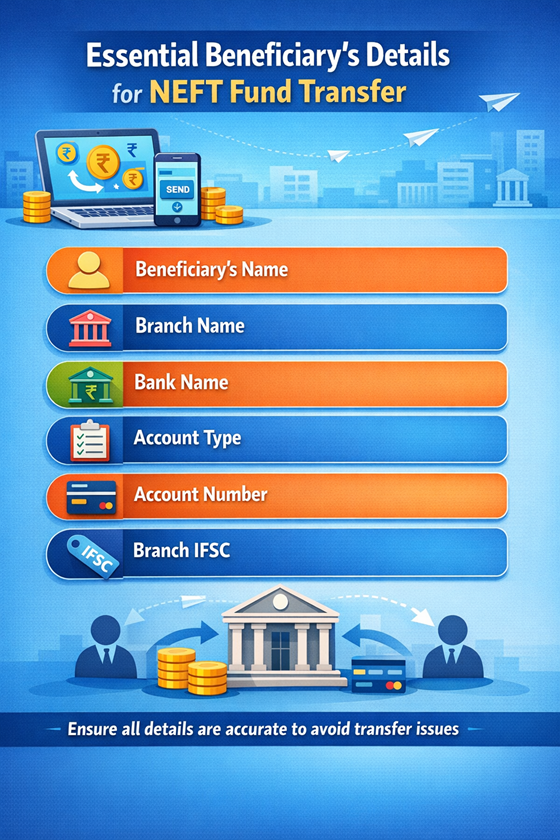
To initiate the transaction, the sender must provide the beneficiary's details, including the bank name, transfer amount, and other relevant information. Fill in these details in the NEFT application form and authorise the bank to debit the required amount for the transaction.
Step 2: NEFT Processing by Banks
The sender’s bank checks the balance and verifies the transaction details. After verification, the bank prepares a secure electronic payment instruction. Then, the bank sends it to the NEFT service centre.
Step 3: Transaction Batching and Settlement by RBI
The NEFT service centre collects transactions and batches them by bank.
Step 4: Funds Debit and Credit Process
The sender's bank debits the specified amount from the sender's account in accordance with the settlement instructions. The amount is transferred to the RBI. Before funds are transferred to the beneficiary's account, they are briefly held by the RBI. The beneficiary's bank receives the money from the RBI and credits the designated amount to the account.
Also Read: Payee Meaning in Banking and Finance Explained
Step 5: Transaction Confirmation and Notification
Both the sender and the beneficiary receive confirmation notifications from their respective banks following the completion of the transaction.
Read More: How Borrowers Can Use Personal Loan Apps for Emergency Costs?
Features and Advantages of NEFT
NEFT is a convenient choice to transfer funds for both individuals and businesses.
Here are the features and advantages of NEFT that make payments seamless:
- 24/7 Availability: You can transfer funds anytime, any day, via online transfers. At bank branches, there are limited hours
- Wide Acceptance: With NEFT, you can send funds to any bank in India. Plus, you can transfer money to Nepal, but there may be additional requirements. You can also send money to a Non-Resident External and Non-Resident Ordinary account
- Secure Transactions: The RBI oversees the secure electronic network, which uses end-to-end encryption. This reduces the possibility of theft or loss.
- Low Cost: RBI does not levy processing charges on member banks. No charges are levied on savings bank account customers. Plus, RBI has set a limit on the maximum charges for outward transactions
- Convenience: The sender can initiate a transaction from anywhere through online banking
Who Can Use NEFT? Eligibility and Requirements
Funds can be transferred between NEFT-enabled bank accounts by individuals, companies, and organisations. A current or savings bank account is required for the beneficiary.
Here’s a list of who can use NEFT to transfer funds:
- Individuals with Bank Accounts: If you have a savings or current account with a NEFT-enabled bank, you can initiate transactions to other accounts
- Individuals Without Bank Accounts: If you do not have a bank account, you can visit the branch of a member bank and initiate cash transactions. The maximum amount limit to carry out such transactions is set to ₹50,000 per transaction
Corporations and Companies: Businesses can transfer funds between accounts and to vendors with NEFT
Tip: Disrupted cash flow, but need to make payments to vendors? Get a personal loan to manage your cash flow efficiently.
Need a personal loan fast? Download our personal loan app and apply in just a few minutes!
How to Initiate NEFT Transfer: Online and Offline Methods
You can initiate NEFT transfers both online and offline. Here’s a quick guide to completing NEFT transfers through online and offline methods:
Transfer Money Through NEFT Online
Here’s how you can do NEFT through your bank’s mobile app, website, or net banking portal:
- Visit the website, or the online portal, or open the mobile app
- Sign in with your credentials
- Go to the fund transfer section and select “NEFT”
- Click on “Add beneficiary” if you haven’t added them already
- Confirm the details and select the option to initiate the transaction
- Enter the amount to transfer and confirm the details
- Verify the transaction through the OTP you received on your registered mobile number or through your internet banking password
- Click on “confirm” to send the transaction for processing
You will receive a confirmation or reference number. Keep it with you for reference
Transfer Money Through NEFT Offline
To process NEFT offline, you need to visit the bank branch. Here’s a detailed guide to follow:
- Ask the bank representative for the NEFT form, or download the form online and print it
- Fill in the required details
- If paying by cheque, enter the cheque number, and if paying in cash, fill in the note denominations
- Sign it and print your name below the signature
- Submit the form with the cheque or cash at the bank counter
- After the transaction is processed, you will receive a confirmation from your bank via SMS or email
Transfer Funds Through NEFT
NEFT makes it simple to transfer funds for individuals and businesses. You can initiate a transaction at a bank branch even if you don't have a bank account.
Ensure to add the correct beneficiary details and amount, and verify before submitting. RBI-regulated security standards make it a secure choice for both personal and business transactions.
When you need funds quickly to cover unexpected expenses, a personal loan provides the financial support you need. Hero FinCorp offers quick approval and a paperless process. We not only simplify borrowing but also support you in managing short-term financial needs with confidence.
So explore our personal loan solutions and take control of your finances without unnecessary delays!
Frequently Asked Questions
What does NEFT stand for in Indian banking?
NEFT stands for National Electronic Funds Transfer. It is a system maintained by the RBI to ensure convenient and seamless transfer of funds.
Can I transfer any amount using NEFT? Are there limits?
The RBI has not imposed any limit on fund transfers using NEFT. However, banks may set limits based on risk perception, with approval from their boards.
How much time does it take to finish an NEFT transaction?
An NEFT transaction typically takes one to two hours to complete. However, the time depends on both the time you initiated the transaction and the bank's processing time.
Are there any charges for NEFT transfers?
The RBI does not levy any charge for processing online NEFT transactions. Plus, RBI has directed banks not to charge fees for online transactions from savings accounts. However, if you initiate a transaction at a bank branch, fees are charged based on the amount transferred.
Can NEFT transactions be done on weekends and bank holidays?
You can initiate NEFT transactions online on weekends and bank holidays. But if you want to visit a bank branch, you cannot initiate the transaction on weekends or bank holidays.
What should I do if I enter incorrect beneficiary details?
It is the responsibility of the sender to enter the correct beneficiary details. The amount has been credited to the account number you provided in the form. However, if the account number is invalid, the amount will be refunded.
