How to Do Offline UPI Payment?
Unified Payments Interface (UPI) has completely transformed how India handles and pays money.
As per a report, UPI spending reached Rs. 94,000 crore per day in October 2025. Yet, dependence on mobile internet (3G/4G/5G) or Wi-Fi can be a major issue. This is where offline UPI payment becomes essential.
Using the simple USSD (Unstructured Supplementary Service Data) code “*99#”, you can complete transactions without mobile data or Wi-Fi. This service ensures that financial inclusion reaches every corner of the country, making instant payments possible even on a basic feature phone. Wondering how it works? Here is a detailed guide to making an offline UPI payment.
Offline UPI Payment Setup: Step-by-Step Guide
Setting up your system for offline UPI payments is pretty easy, since your bank account and mobile number are already linked. You may ask how to do an offline UPI payment.
The readiness begins with these steps:
- Ensure Mobile Number is Linked to Bank Account: The *99# service verifies your mobile number directly with your bank. You must use the SIM card tied to your primary bank account.
- Basic Mobile Network: The system does not require internet data; however, it does require a basic cellular signal to enable USSD.
- Enable UPI for Your Account: You need to have already enabled UPI for your bank account. If not, use any standard UPI app, such as BHIM or your bank's app, to create a UPI number.
- Set your UPI PIN: You need an active UPI PIN linked to your account. The PIN will be important for authorising offline transactions, just as it is for online transactions.
Also Read: What Is a CIF Number and Why Does It Matter?
How to Make Offline UPI Payment: Complete Process
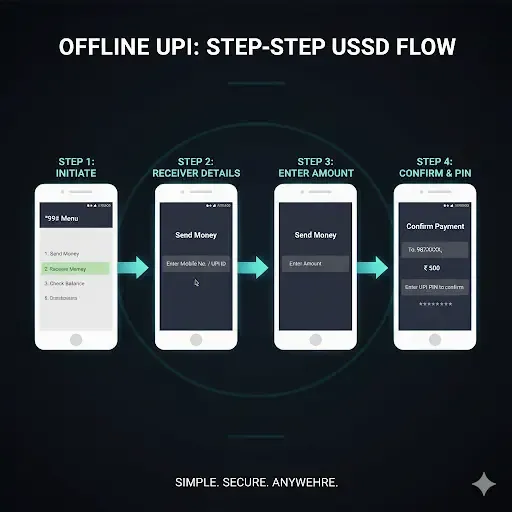
The entire offline UPI payment process can be done in four simple steps:
Step 1: Dial the 99# USSD Code
To initiate the service, open the dialler on your phone and punch in the offline UPI payment number "*99#", then press the call button. Instantly, a small, text-based menu will appear on your screen.
Step 2: Choose Bank and Transaction Type
If there are multiple bank accounts associated with your mobile phone number, the system will first prompt you to select the account you want to transact from.
Then, select your desired action from the menu: "Send Money", "Request Money", or "Check Balance".
Most of the routine payments will involve the option "Send Money".
Step 3: Enter Beneficiary and Amount Details
You will be asked to enter the beneficiary details. You are allowed to put the information of the beneficiary in three ways:
- The mobile number of the recipient linked to UPI,
- The UPI ID like name@upi
- Bank account number with the IFSC code
Once you input the beneficiary's information, you will have to enter the exact amount of the transaction.
Step 4: Confirm Payment with UPI PIN
The last and most crucial step to make an offline UPI payment is authorisation. You need to enter your secret UPI PIN to confirm the transaction.
Once the PIN is accepted, you will get an on-screen confirmation message stating "Payment Successful" along with a transaction reference number. The transaction happens in real time, hence ending the process without using the internet.
Benefits of Offline UPI Payment
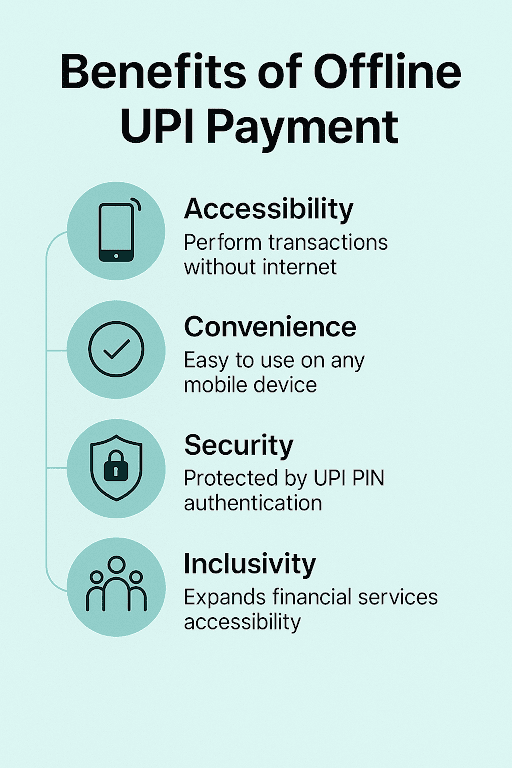
The UPI offline payment benefits turn it into an efficient backup and main payment method for many, since:
- Works Without Internet: The main benefit is that you can send and receive money without mobile data or Wi-Fi.
- Accessible to All Phones: It works seamlessly on both sophisticated smartphones and basic feature phones.
- Ideal for Low-Connectivity Areas: Especially if you live in rural India or travel to weak network areas.
- Secure and PIN-based: Every transaction will be protected by your secret UPI PIN for enhanced security.
- Fast & Easy: Menu-driven interface, fast, and no need to load or update apps.
Also Read: How UPI Is Redefining Instant Loan Repayments in India
Transaction Limits and Charges for Offline UPI Payment
Offline UPI payment has a per-transaction limit of ₹ 5,000. It is essential to ensure safety and deter high-value transactions through this channel.
As for charges, most banks don't charge for the *99# transaction itself. Some mobile service providers might charge a nominal USSD service charge (around ₹ 0.50 per session), which will be deducted from your mobile talk-time balance.
Short on cash? Get instant funds - download our Instant Loan App and apply for your loan today!
Supported Banks and Mobile Operators for Offline UPI Payments
Almost all major private and public Indian banks support *99#, including:
- HDFC Bank
- State Bank of India (SBI)
- ICICI Bank
- Kotak Mahindra Bank
- Axis Bank
- Canara Bank
- Bank of Baroda
- Punjab National Bank
- Union Bank of India
Telecom operators supporting *99# include:
- Airtel
- Jio
- BSNL
- Vodafone-Idea
Also Read: What Is A UPI Mandate? Meaning, Uses, Application & How It Works
Stay Payment-Ready, No Matter the Network
Offline UPI has quietly become one of the most useful additions to India’s digital payment ecosystem. It gives you the freedom to make quick transfers, even when your internet connection drops or you’re in an area with patchy coverage.
So whether you are paying a small bill, sending money to a family member, or even clearing your loan EMI, offline UPI can ensure you don’t miss your payment date due to poor network coverage.
With platforms like Hero FinCorp, you can even use UPI (online or offline) to stay punctual with your EMI payments, giving you one less thing to worry about in your financial routine.
Check out our personal loan app and apply for your personal loan today!
Frequently Asked Questions
1. Can I make offline UPI payments on a feature phone?
Yes, feature phones work perfectly because *99# runs on USSD, not the internet.
2. What if my internet is down, but the mobile network is available?
Offline UPI will still work. You only need a mobile signal for the transaction to go through.
3. Can I receive money via offline UPI?
Yes, you can request money and also receive payments through your UPI ID.
4. Are offline UPI payments safe during network fluctuations?
Yes. Your UPI PIN and bank-grade authentication protect transactions.
5. How do I disable the offline UPI service?
You can disable it by removing your bank account from the UPI app or contacting your bank.
6. Can I pay merchants directly using offline UPI?
Yes, you can send money to merchants using their UPI ID or mobile number via *99#.
Disclaimer: The information provided in this blog post is intended for informational purposes only. The content is based on research and opinions available at the time of writing. While we strive to ensure accuracy, we do not claim to be exhaustive or definitive. Readers are advised to independently verify any details mentioned here, such as specifications, features, and availability, before making any decisions. Hero FinCorp does not take responsibility for any discrepancies, inaccuracies, or changes that may occur after the publication of this blog. The choice to rely on the information presented herein is at the reader's discretion, and we recommend consulting official sources and experts for the most up-to-date and accurate information about the featured products.