Days Past Due: Meaning & Calculation in CIBIL Report

If you have ever opened your CIBIL report and wondered what those numbers like 000, 030, or 090 are trying to say, you are not alone. Most of us focus on the credit score and miss the one detail lenders quietly study first: Days Past Due.
Think of it as your EMI discipline scorecard. A small delay today can shape tomorrow’s loan decisions. So let’s decode it in the easiest, most practical way.
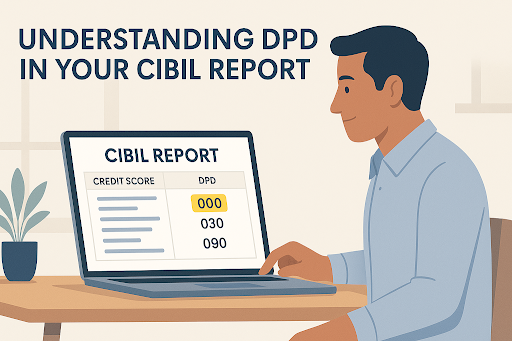
What is Days Past Due?
Days Past Due, or DPD, is simply the number of days you are late in paying a loan EMI or credit card bill. Even a one-day delay shows up here.
Lenders in India rely on this metric to gauge your repayment discipline and how responsibly you handle credit. A clean DPD shows stability. A delayed one signals risk. This small value often shapes how lenders judge your creditworthiness when you apply for a loan.
Why is Days Past Due Important in Your CIBIL Report?
Vivek has a CIBIL score of 720 and feels confident while applying for a personal loan. But the lender spots something he never noticed. His last month’s DPD showed a ten-day delay.
For Vivek, it was a minor slip. For the lender, it was a warning sign. The result? The lender asked for more documents and offered a higher interest rate to stay cautious.
That’s why it is crucial to understand the real impact of Days Past Due in a CIBIL report:
- Even a short DPD delay can slowly bring your credit score down.
- Frequent late payments can slow down or block approvals.
- A clean DPD record often unlocks better interest rates and smoother processing.
- Lenders study DPD trends to see if overdue payments are occasional or habitual.
- Higher DPD across loans signals financial stress and reduces lender confidence.
Dreaming of a clean DPD streak? Use an EMI calculator to choose an amount and loan terms your wallet can handle easily, so every payment stays on time.
How to Calculate Days Past Due?
Calculating DPD is easier than most people expect. It is simply the difference between your EMI due date and the actual date on which you make the payment.
Days Past Due formula:
DPD = Actual Payment Date minus Due Date
For example, if the due date of your loan was 5 June and you paid on 5 June, your DPD is 0. But, if the due date was 10 July and you paid on 20 July, your DPD is 10.
That’s all lenders need to see whether a payment was on time, slightly late, or delayed enough to raise concern.
How to Calculate Days Past Due in Excel
Excel makes DPD calculations simple, especially if you manage multiple EMIs or maintain a loan tracking sheet. You do not have to count the days manually. Excel handles that.
Here are the two easiest ways to calculate Days Past Due in Excel.
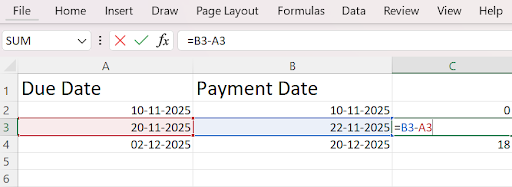
Method 1: Basic Date Subtraction
Formula: =B2-A2 where,
A2 = Due date
B2 = Payment date
Excel returns the number of delayed days.
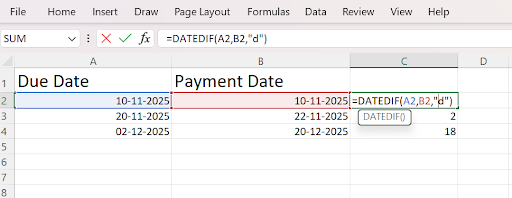
Method 2: Using DATEDIF
Formula: =DATEDIF(A2,B2, “d”).
This gives you the delay in complete days. Once done, drag the formula across rows to automate DPD for multiple accounts.
Pro Tip: Use conditional formatting to highlight DPD entries above 30 days. It helps you spot risky delays without manually scanning every row.
Understanding DPD Values and Their Interpretation in CIBIL Reports
Want to read your CIBIL report the way lenders do? Here is a simple breakdown of the most common DPD values you will see in India and what they reveal about your repayment behaviour.
| DPD Value | Meaning |
| 000 | Paid on time. No delay. Strongest entry |
| 030 | Delayed by 30 days. Clear sign of late payment |
| 060 | Delayed by 60 days. Serious concern for lenders |
| 090 | Delayed by 90 days. Indicates high risk |
| STD | Standard/healthy account with regular payments |
| SUB | Substandard account, overdue for more than three months |
| DBT | Doubtful account with long overdue payments |
| LSS | Loss account with very low recovery expectation |
How to Correct Errors in Your DPD Report
Sometimes your CIBIL report may show a delayed payment even when you paid on time. It could be a lender’s update delay, a system mismatch, or just an incorrect date entry.
The good news? You can fix it. Here is the simplest way to raise a dispute and get a wrong DPD corrected.
Step 1: Visit www.cibil.com and download your report from the “My Account” or “Credit Reports” section.
Step 2: Scan the DPD column for delays that look incorrect or impossible.
Step 3: Collect bank statements, UPI screenshots, or SMS receipts—anything that shows you paid on time.
Step 4: Go to the Dispute Resolution section, select the account with the wrong entry, and choose “Incorrect DPD.”
Step 5: Add a short note explaining the error and attach your payment proof.
Step 6: Wait for verification. CIBIL sends your dispute to the lender for confirmation.
Step 7: Log in regularly to track whether it is still under review or has been resolved.
Once verified, the corrected value will appear in your report during the next update cycle.
Also Read: What Is Suit Filed and How To Remove It in CIBIL Report?
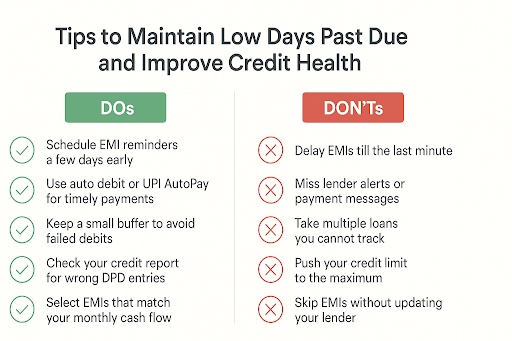
Keep Your DPD Clean and Borrow with Confidence
A clean DPD history is one of the biggest trust signals you can give a lender. Pay EMIs on time, watch your credit report, and let your discipline work for you. When you are ready to borrow, Hero FinCorp offers a fast, digital borrowing journey built around your convenience.
Apply online and take your next step with ease.
Frequently Asked Questions
Can Days Past Due be removed from my CIBIL report?
Yes, but only if the entry is incorrect and verified through a dispute.
How often is DPD updated in the CIBIL report?
CIBIL updates DPD every month based on lender submissions.
Does paying after the due date but within 90 days affect DPD?
Yes. Even a 1-day delay shows as DPD above zero.
What is the difference between DPD and NPA?
DPD counts delayed days. NPA refers to accounts that are 90 days or more overdue.
Disclaimer: The information provided in this is for informational purposes only. While we strive to present accurate and updated content, travel conditions, weather, places to visit, itineraries, budgets, and transportation options can change. Readers are encouraged to verify details from reliable sources before making travel decisions. We do not take responsibility for any inconvenience, loss, injury, or damage that may arise from using the information shared in this blog. Travel involves inherent risks, and readers should exercise their judgment and caution when implementing recommendations.