How to Pay a Credit Card Bill Through UPI
- What Is Credit Card Bill Payment Through UPI?
- Benefits of Paying Credit Card Bills Through UPI
- Step-by-Step Guide: How to Pay a Credit Card Bill Using UPI
- Paying Credit Card Bill Through Paytm, PhonePe, Google Pay: Quick Comparisons
- Is It Safe to Pay Credit Card Bills Through UPI?
- Best Practices for Safety
- Use UPI Apps to Make Timely Credit Card Payments
- Frequently Asked Questions
UPI (Unified Payment Interface) has made credit card bill payment easier than ever before. With just a UPI ID and your favourite payment app, you can clear your credit card dues instantly, securely, and without dealing with complex banking steps.
Wondering how this works? In this post, we will discuss the end-to-end process of paying credit card bills through UPI, the benefits of UPI for credit card payments, a step-by-step procedure to clear your credit card dues using UPI, and more.
What Is Credit Card Bill Payment Through UPI?
Paying credit card bills via UPI is a digital payment method that lets customers use apps such as PhonePe, Google Pay, Paytm, or BHIM that support UPI. With just a UPI ID, users can instantly transfer money via UPI, a real-time payment system.
Additionally, there is no need to remember multiple login credentials or wait for transaction processing times.
Also Read: UPI Transaction Limit Per Month
Benefits of Paying Credit Card Bills Through UPI
There are several benefits of paying credit card bills through UPI, including:
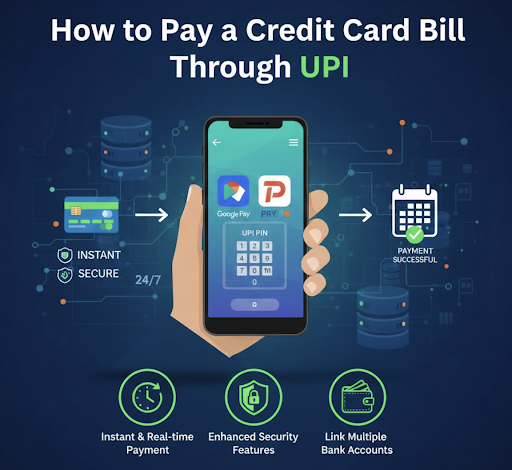
Instant & Real-time Payment
Credit card payments are processed in real time, ensuring your payment is reflected in your credit card account immediately.
24/7 Availability
This option allows you to pay your credit card bill through UPI anytime, anywhere – even on weekends, holidays, and outside banking hours.
Minimal/No Transaction fees
Most UPI platforms charge minimal or no extra fees for credit card bill payments, making it more cost-effective as compared to other payment methods.
Enhanced Security Features
UPI transactions use multi-factor authentication, including UPI PIN, device verification, and bank-level encryption. This ensures complete safety and confidentiality of your financial data.
Convenience of Linking Multiple Bank Accounts
You can link multiple bank accounts to your UPI app and select any account to pay your credit card bill from. This means higher freedom and flexibility in managing your finances.
Auto Bill Fetching and Easy Tracking
Several UPI apps can automatically retrieve your outstanding credit card amount, thus eliminating manual entry errors and ensuring accurate payments.
Rewards and Cashback Integration
Several UPI apps offer decent cashbacks, reward points, or other incentives for credit card bill payments, adding extra value to your transactions.
Helps Avoid Late Payment Fees
By paying with a credit card via UPI Payment App, you benefit from instant processing and easy access. This will help you avoid unnecessary late payment charges and fees.
Step-by-Step Guide: How to Pay a Credit Card Bill Using UPI
Here is a stepwise guide you can follow to pay your credit card payment through UPI:
- Step 1: Download and Set Up UPI: Install a trusted UPI app such as PhonePe, Google Pay, Paytm, BHIM UPI, or Amazon Pay.
- Step 2: Generate a UPI ID and Associate Bank Accounts: Create a UPI ID and related bank accounts. Before linking your bank account, confirm your mobile number. To make payments, you will be assigned a UPI ID and can create a UPI PIN.
- Step 3: Go to the Credit Card Bill Payments Section of the App: Depending on your app, select the Bills, Credit Card, or Recharge & Pay Bills tab.
- Step 4: Enter Your Credit Card Details: Select your card issuer or manually input your credit card number if necessary.
- Step 5: Payable Amount Verification: The app automatically retrieves your payable amount. Otherwise, you can add it to the invoice yourself.
- Step 6: Choose Payment Method and Enter UPI PIN: Select your linked bank account, confirm the amount, and enter your UPI PIN to authorise the payment.
- Step 7: Verify the Transaction: After the payment is complete, take a photo of the transaction ID for your records.
Paying Credit Card Bill Through Paytm, PhonePe, Google Pay: Quick Comparisons
Here’s a breakdown of how Paytm, PhonePe, and Google Pay compare when it comes to paying credit card bills through UPI:
| Feature | Paytm | PhonePe | Google Pay |
|---|---|---|---|
| UPI Credit Card Payment Support | Supports most major banks | Wide bank coverage | Fast UPI-based credit card payments |
| Ease of Use | Very easy | Smooth UI | Minimal UI; clean and fast |
| Rewards / Cashback | Occasional cashback & scratch cards | Cashback offers during promos | Scratch cards; rewards vary |
| Bill Reminders | Strong reminders, auto-fetch due amount | App reminders + notifications | Basic reminders via notifications |
| Processing Speed | Instant UPI posting | Instant, reliable | Very fast & stable |
| Additional Features | Track past bills, EMI options | Reward points, multiple payment modes | Simple flow, secure payments |
Is It Safe to Pay Credit Card Bills Through UPI?
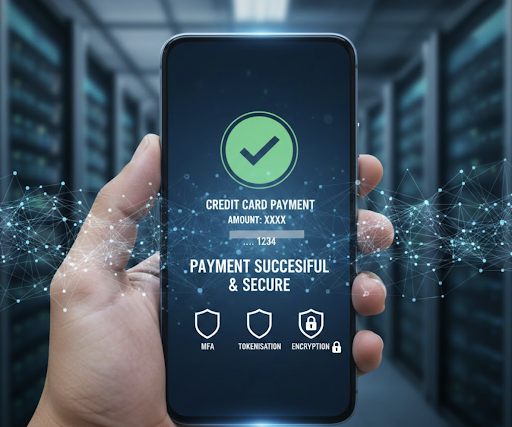
Yes, paying credit card bills through UPI is generally very safe because of robust security features, including:
- Multi-Factor Authentication: Credit card payments made via UPI require a PIN and, for transactions, an OTP, adding layers of security.
- Tokenisation: In this payment option, your actual card details aren't shared. Rather, the risk of data theft is decreased by using a unique token.
- Bank-Level Encryption: To safeguard your financial information, the system uses robust encryption.
Also Read: UPI Risk Policy: Navigating New Rules and Staying Secure in 2026
Best Practices for Safety
When UPI is used for credit card payment, there are security practices that one should always follow:
- Use Official Apps: Only dependable UPI apps (PhonePe, Paytm, and Google Pay) should be used.
- Protect PINs: Ensure that no one is aware of your UPI PIN or passwords.
- Prevent Phishing: Don't click on dubious URLs or open attachments from senders you don't know.
Use UPI Apps to Make Timely Credit Card Payments
On-time credit card bill payments are essential to maintaining a clean financial record. Using UPI apps such as PhonePe, Google Pay, and Paytm can significantly simplify bill payment.
At Hero FinCorp, we make your payment journey even simpler. From instant loan applications to easy AutoPay setup and real-time tracking, you can do everything in minutes.
So why wait? Explore Hero FinCorp’s digital solutions today and stay in control of your credit card payments with confidence!
Frequently Asked Questions
Can I pay my credit card bill through UPI from any bank account?
Yes, you can pay your credit card bill using UPI from any bank account linked to a UPI app.
Are there any extra charges for credit card bill payments via UPI?
No. For most users, paying credit card bills via UPI is free.
How long will it take for the payment to appear on my credit card account?
Your credit card payment usually reflects within 1-2 business days for digital payments (UPI, NEFT, IMPS).
Is UPI safe to use on public Wi-Fi for credit card payments?
No, it's not safe to use UPI on public Wi-Fi for credit card or bank payments, as these networks are unsecured.
Can I use UPI to set up automatic payments for my credit card bills?
Yes, you can use UPI AutoPay to set up automatic credit card bill payments.
Disclaimer: The information provided in this blog post is intended for informational purposes only. The content is based on research and opinions available at the time of writing. While we strive to ensure accuracy, we do not claim to be exhaustive or definitive. Readers are advised to independently verify any details mentioned here, such as specifications, features, and availability, before making any decisions. Hero FinCorp does not take responsibility for any discrepancies, inaccuracies, or changes that may occur after the publication of this blog. The choice to rely on the information presented herein is at the reader's discretion, and we recommend consulting official sources and experts for the most up-to-date and accurate information about the featured products.