How to Transfer Money Through UPI?
Indians made 690 million UPI transactions in November 2025 alone!
From paying the local store to sending rent or splitting a dinner bill, UPI money transfer has quietly become second nature for most of us. It’s quick, fuss-free, and works across every major bank and payment app.
But if you’ve ever wondered how the whole process actually works, this guide will walk you through every method and every step.
Different Ways to Transfer Money Through UPI
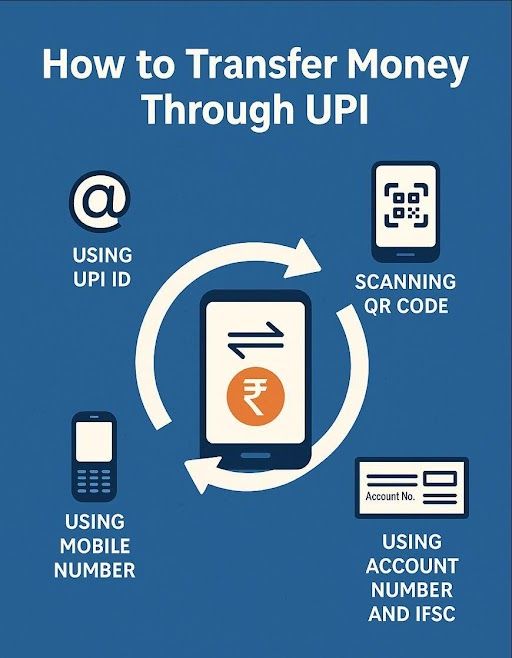
UPI gives you multiple ways to send money, all equally simple. Here’s how each method works.
Using UPI ID
Every user gets a unique UPI ID (like an email handle) linked to their bank account. Enter the receiver’s UPI ID, confirm their name, type the amount, and pay. It’s handy when you don’t want to share your phone number or bank details.
Using Mobile Number
If the receiver’s number is linked to UPI, you can transfer money directly using their mobile number. Just enter the number and verify the beneficiary details. Then, complete the transfer as usual. UPI transfers using mobile numbers are great for quick person-to-person transfers.
Scanning QR Code
You must’ve seen shops, restaurants, and service providers with QR codes. To pay them, you open the UPI app, scan the merchant’s QR code, and complete the payment. Depending on the type of QR code, you may not be required to enter the amount. QR codes are pretty straightforward: No typing, no room for error, just scan and send.
Using Account Number and IFSC
Useful when the receiver isn’t on UPI. Enter the bank account number, IFSC code, and name. UPI still handles the transfer, but it feels like a traditional bank transfer with faster processing.
Step-by-Step Guide: How To Transfer Money Through UPI ID
Here’s how to transfer money through UPI:
- Download any UPI-enabled app. It could be Google Pay, PhonePe, Paytm, BHIM, or even your banking app.
- Register your mobile number that’s linked to your bank account.
- Select your bank. The app will automatically fetch your account details after secure verification.
- Set up your UPI PIN/MPIN. This is a secret 4- or 6-digit code that authenticates every payment.
- Select your preferred mode of transfer. Remember, you can do UPI transfers through UPI ID, mobile number, QR scan, or account+IFSC.
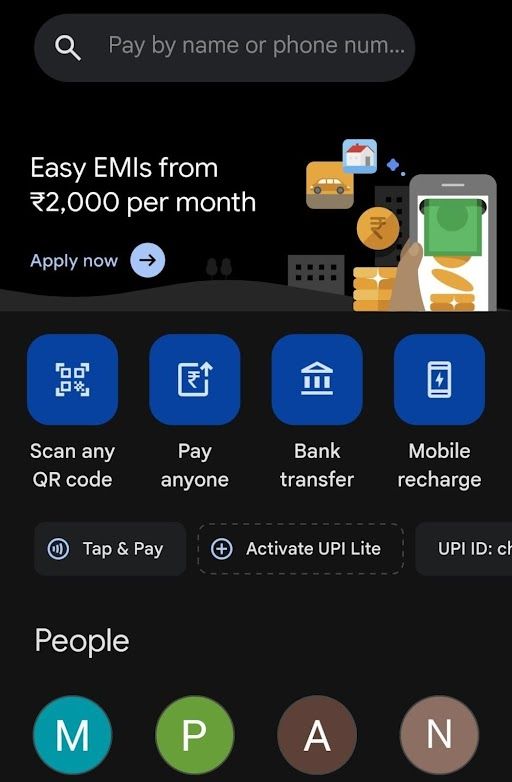
- Verify the receiver’s name and enter the amount.
- Key in your UPI PIN to authorise the transaction.
- Wait for the confirmation message. The transfer usually completes in seconds.
Common Issues in UPI Money Transfer and How to Fix Them
Even the best tech stumbles sometimes. Here’s how to decode and fix common UPI glitches.
| Issue | What It Means | How to Fix It |
|---|---|---|
| UPI Server Down | Bank or app servers are overloaded. | Wait a few minutes or switch to another UPI app. |
| Incorrect PIN | Wrong UPI PIN entered. | Reset your PIN using your debit card details. |
| Payment Declined by Bank | The system is unable to validate your account. | Check balance, ensure account is active. |
| Pending Transaction | Delay in confirmation from the receiver’s bank. | Wait for settlement; don’t retry immediately. |
| Daily Limit Exceeded | You’ve hit your daily transfer cap. | Try the next day again or reduce the amount. |
Benefits of Using Hero FinCorp’s NBFC Services with UPI
UPI doesn’t just make day-to-day payments smoother; it also simplifies how you handle your financial commitments with trusted NBFCs like Hero FinCorp. Whether you’re paying EMIs, insurance instalments, or loan fees, UPI keeps it instant and traceable.
Hero FinCorp’s digital-first platform also makes it easier for you to explore credit products, check eligibility, or apply for a loan. Ready to simplify your financial life? Download Hero FinCorp’s app today!
Frequently Asked Questions
Can I transfer money using UPI without a bank account?
Yes, you can use UPI without a traditional bank account. For this, you need digital wallets that support UPI or UPI-enabled RuPay credit cards.
What should I do if my UPI transaction fails, but money is debited?
The amount is usually reversed within a few hours. If not, raise a complaint through your UPI app.
Is there a limit on UPI transfers per day?
Yes. Most banks allow up to ₹1 lakh per day, though limits vary by app and bank.
Are UPI transactions safe? What precautions should I take?
Yes, UPI is secure. Just keep your PIN private, avoid unknown requests, and never approve “collect” requests you didn’t initiate.
Disclaimer: The information provided in this blog post is intended for informational purposes only. The content is based on research and opinions available at the time of writing. While we strive to ensure accuracy, we do not claim to be exhaustive or definitive. Readers are advised to independently verify any details mentioned here, such as specifications, features, and availability, before making any decisions. Hero FinCorp does not take responsibility for any discrepancies, inaccuracies, or changes that may occur after the publication of this blog. The choice to rely on the information presented herein is at the reader's discretion, and we recommend consulting official sources and experts for the most up-to-date and accurate information about the featured products.