How to Get Phone Number from UPI ID?
- What Is a UPI ID and How Does It Work?
- Can You Get a Phone Number from a UPI ID? Legal and Privacy Overview
- What Details Appear in UPI Transaction History?
- Why Is the Phone Number Not Visible in the UPI ID or Transactions?
- How to Contact Someone After a UPI Transaction Without Their Phone Number
- Tips to Protect Your Phone Number and Personal Info on UPI
- UPI Privacy Keeps You Safer Every Day
- Frequently Asked Questions
We trust UPI for everything today, from QR scans to monthly bill payments. So when you spot a strange transaction or send money to the wrong person, your heart skips a beat.
Your first instinct is to figure out how to get a phone number from the UPI ID so you can contact them quickly. But UPI works differently. This guide explains what is possible, what is restricted, and the safe ways to contact someone without overstepping privacy rules.
What Is a UPI ID and How Does It Work?
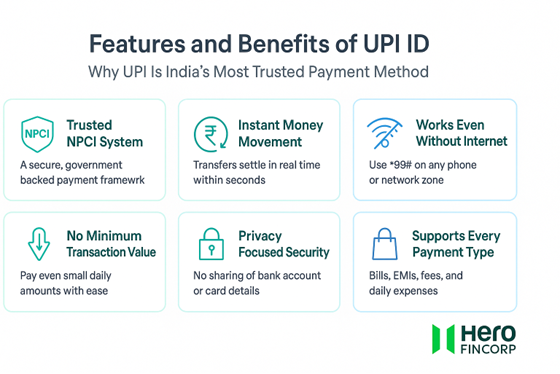
A UPI ID is your Virtual Payment Address (VPA). It works like a digital username, allowing funds to be deposited into your bank account without sharing your personal details. The transfer happens securely in the background via your UPI app and your bank.
Common formats include:
Mobile number-based VPAs like 98xxxxxx90@upi
Name-based VPAs like rahul213@bank
Custom handles like shopname@pay
Even if your VPA includes your number, it does not give anyone access to your actual phone details. UPI uses this ID only to route payments safely through NPCI’s network.
And that same trusted UPI flow now powers smooth EMI payments too. With Hero FinCorp, you can apply online and make every repayment an automatic, stress-free experience.
Also Read: How to Create Your UPI Number Using a Mobile Banking App
Can You Get a Phone Number from a UPI ID? Legal and Privacy Overview
The short answer is no. You cannot pull someone’s phone number from a UPI ID. NPCI and RBI have strict data protection rules that stop UPI apps from revealing personal info during payments.
Any attempt to extract someone’s phone number without consent is not allowed. Any tool or website that claims to reveal numbers from UPI IDs is unsafe and can expose you to legal and financial risks. Avoid them completely.
If you want to contact a person, always use authorized and respectful ways that protect both sides.
Also Read: Fake UPI Payment: How to Identify Fake UPI Payments?
What Details Appear in UPI Transaction History?
Your transaction history usually shows limited but helpful information. These details allow you to track payments without exposing sensitive data.
A typical UPI transaction shows:
- Recipient name
- UPI ID
- Amount
- Date and time
- Transaction ID
- Status
Phone numbers usually do not appear. If they do, they are masked to protect the user. Here is a quick look at how different UPI apps handle phone number visibility:
| UPI App | Phone Number Visible? | Notes |
|---|---|---|
| Google Pay | No | Shows only name and UPI ID |
| PhonePe | Usually no | Masked number may appear in case of a saved contact |
| Paytm | Sometimes masked | Depends on your contact list and the type of transaction |
| BHIM | No | Only VPA and name are displayed |
So even if a payment was successful, UPI keeps most personal details private to prevent misuse.
Also Read: What is a UTR Number, Example & How to Check It?
Why Is the Phone Number Not Visible in the UPI ID or Transactions?
UPI hides your phone number for one simple reason: to keep you safe. If numbers were visible in every payment, anyone could misuse them.
Behind the scenes, your app and bank use secure routing, encrypted data, and strict NPCI rules. So even while money moves instantly, your identity stays protected.
This privacy layer also reduces phishing attempts, fake refund scams, and impersonation risks that many digital payment users face.
How to Contact Someone After a UPI Transaction Without Their Phone Number
If you need to reach someone after a UPI payment, you still have a few safe and practical options. None of them breaks privacy rules, and each one works in real situations.
- Check your transaction details. Sometimes the name or business information is enough to identify the person.
- Message through the app you used earlier. If you connected via chat or a merchant listing, use the same channel.
- Check for mutual contacts. Friends or colleagues may help you connect safely.
- Search the merchant on social media or their website. Businesses often list their support numbers publicly.
- Use official customer care channels. Many merchants have help desks or emails for payment queries.
Pro Tip: You can also raise a support ticket in your UPI app. If it is a wrong transfer or dispute, use your UPI app’s help section.
Also Read: Common UPI Frauds and How to Avoid Them
Tips to Protect Your Phone Number and Personal Info on UPI
UPI does a great job of keeping your money safe. A few tiny habits from your side can make it even stronger.
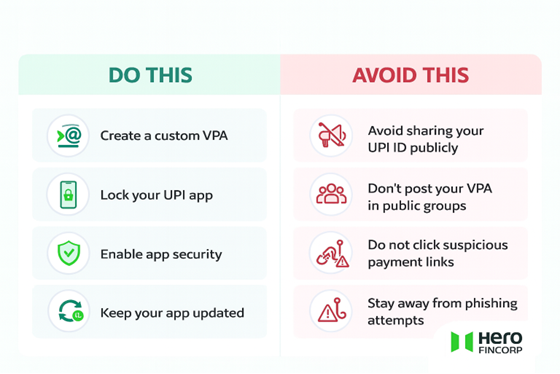
- Create a custom VPA. Avoid using your mobile number in your UPI ID to keep your identity private.
- Share your UPI ID wisely. Skip public groups and random chats. Share it only when needed.
- Secure your UPI app. Fingerprint. App PIN. Screen lock. One extra layer can stop a lot of misuse.
- Keep your app updated. It patches new risks and makes your app stronger.
- Act fast on alerts. If you see any unexpected debit or SMS, open your app and verify it right away.
UPI Privacy Keeps You Safer Every Day
UPI hides phone numbers for a reason. Once you understand what is visible and what stays private, you can handle wrong transfers or unknown payments with confidence.
And if you already trust UPI for everyday payments, you can use the same simplicity with Hero FinCorp. Pay your loan EMIs or set up UPI AutoPay to stay on track without reminders.
Need clarity before borrowing? Check your personal loan eligibility and take your next step with confidence.
Frequently Asked Questions
1. Is it possible to find someone’s phone number using their UPI ID?
No. UPI never shows phone numbers for safety.
2. Are phone numbers visible in UPI transaction history?
No. Most UPI apps mask or hide mobile digits by default to prevent misuse.
3. What should I do if I want to contact someone after a UPI payment?
Use the app’s chat, mutual contacts, merchant pages, or official support channels.
4. Is it legal to extract phone numbers from UPI IDs without consent?
No. It is illegal and violates data privacy rules.
5. How can I protect my phone number privacy when using UPI?
Use custom VPAs, avoid oversharing, and enable app security settings.