How to Cancel UPI Mandate: Step-by-Step Guide

- What Is a UPI Mandate?
- Reasons for Canceling a UPI Mandate
- Understanding the “UPI Mandate Successfully Revoked” Meaning
- How to Cancel UPI Mandate on Popular Payment Platforms?
- Cancel UPI Mandate via BHIM App
- Cancel UPI Mandate via Google Pay
- Cancel UPI Mandate via PhonePe
- Cancel UPI Mandate via Paytm
- Cancel UPI Mandate via Bank Apps
- Contacting Customer Support if App Cancellation Is Not Possible
- Important Points to Remember When Canceling a UPI Mandate
- Difference Between Canceling and Deleting a UPI Mandate
- Impact of Canceling UPI Mandate on Subscriptions and Services
- Security Features of UPI Mandates
- Differences Between UPI Mandates and Auto-Debit
- Stay in Charge of Every Auto Payment
- Frequently Asked Questions
- Can I cancel a UPI mandate at any time?
- How do I confirm that my cancellation was successful?
- Are there any charges for canceling a UPI mandate?
- What is the difference between canceling and deleting a mandate?
- Can I cancel a mandate without visiting the bank?
- What happens to pending payments after cancellation?
Ravi signed up for a streaming subscription using UPI Autopay. The free trial ended, but the monthly charge continued because the mandate stayed active. He noticed the debit only after checking his bank message alerts. Situations like this are common because automatic payments run quietly in the background.
Understanding how to cancel the UPI mandate gives you control over recurring payments. When you know where to check and how to stop auto debits, you avoid unwanted charges and keep your finances predictable.
What Is a UPI Mandate?
Manually approving payments each time is very difficult and a waste of time. You may sometimes forget your SIP, EMI, or utility bill dates, and the bank may charge you a fee for non-payment. To avoid all these issues, you can use a UPI mandate. It is an instruction that allows the merchant to collect payment automatically from your bank account.
This system makes payments seamless and timely. Once approved, the mandate processes payments on scheduled dates until you revoke or modify it.
Reasons for Canceling a UPI Mandate
People choose to cancel automatic payments for practical reasons:
- The free trial ends, but you no longer need the service.
- Subscription costs increase beyond the original budget.
- A loan or EMI linked to autopay has been fully repaid.
- Duplicate mandates exist for the same service.
- The merchant service is no longer in use.
- Payment failures create repeated penalties.
- You prefer manual control over monthly spending.
Stopping auto debits at the right time prevents unnecessary deductions and keeps expenses aligned with your current needs.
Understanding the “UPI Mandate Successfully Revoked” Meaning
When you see the message that a UPI mandate has been revoked, it means you have stopped the automatic payment permission linked to your account. The service provider can no longer debit money under that approval.
If you have allowed any auto payments earlier, they will not occur after revocation. You should always take a screenshot or keep the confirmation message as proof to request the refund immediately if the amount is still deducted.
How to Cancel UPI Mandate on Popular Payment Platforms?
Different apps place mandatory controls in slightly different locations. The process remains similar across platforms. You locate the autopay section, select the active mandate, and revoke authorization.
Cancel UPI Mandate via BHIM App
- Open the BHIM app and navigate to mandates.
- Select the active autopay request.
- Review the details carefully.
- Tap revoke and confirm using your UPI PIN.
- You receive a confirmation message once the mandate is cancelled.
Cancel UPI Mandate via Google Pay
- Open Google Pay and tap Autopay or Mandates.
- Choose the active subscription.
- Check payment details and next debit date.
- Select the cancel mandate and confirm.
- Authentication completes the cancellation.
Cancel UPI Mandate via PhonePe
- Launch PhonePe and go to Autopay settings.
- Select the mandate you want to stop.
- Review merchant and debit details.
- Tap revoke and confirm with your PIN.
- A success message appears instantly.
Cancel UPI Mandate via Paytm
- Open Paytm and access automatic payments.
- Choose the active instruction.
- Verify payment schedule.
- Tap cancel autopay and confirm.
- The system displays revocation confirmation.
Cancel UPI Mandate via Bank Apps
- Log in to your bank mobile app.
- Open UPI autopay or standing instructions.
- Select the mandate linked to the merchant.
- Choose revoke and authenticate.
- The mandate status updates immediately.
Contacting Customer Support if App Cancellation Is Not Possible
If the app does not show the mandate, contact your bank or payment provider. Share the merchant name and debit details. Support teams can locate and revoke the authorization from their system.
Important Points to Remember When Canceling a UPI Mandate
Keeping a few precautions in mind ensures a smooth cancellation:
- Cancel at least one day before the debit date.
- Confirm revocation status inside the app.
- Save the cancellation confirmation message.
- Check your bank statement after the due date.
- Contact support if a debit occurs after cancellation.
- Ensure no pending dues remain with the merchant.
Difference Between Canceling and Deleting a UPI Mandate
Canceling stops future debits, while deleting removes records from your app interface. Canceling is the essential step because it withdraws authorization.
| Action | What it does | Impact |
|---|---|---|
| Cancel | Stops future debits | Prevents auto payments |
| Delete | Removes visible record | Does not stop debit if not revoked |
Impact of Canceling UPI Mandate on Subscriptions and Services
Once a mandate is canceled, the service provider cannot collect future payments automatically. Access to the service may stop at the end of the billing cycle.
Some platforms allow manual renewal if you wish to continue. Checking the service terms ensures you avoid disruption if the subscription remains important.
Security Features of UPI Mandates
UPI mandates include safeguards that protect users:
- UPI PIN authentication for approval and cancellation
- Debit limits set during authorization
- Advance notification before deduction
- Secure bank-level encryption
- Easy revocation through apps
These protections ensure automated payments remain safe and controlled.
Differences Between UPI Mandates and Auto-Debit
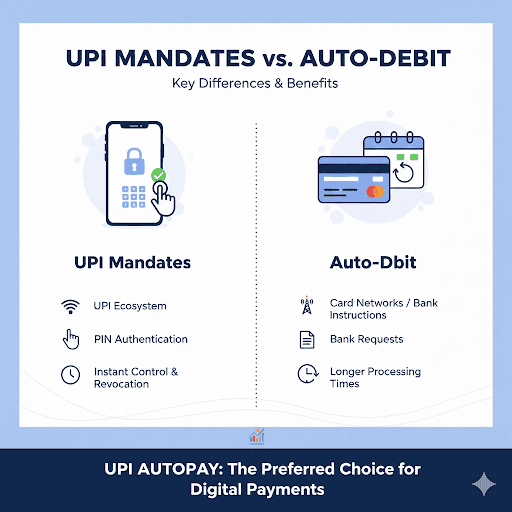
UPI mandates operate within the UPI ecosystem and require PIN authentication for approval. Traditional auto debit instructions often rely on card networks or bank standing instructions.
UPI mandates provide real-time control and instant revocation. Auto debit systems may require bank requests and longer processing times. This flexibility makes UPI autopay a preferred choice for digital payments.
Stay in Charge of Every Auto Payment
Automatic payments make daily life easier, but it is also important for you to know where your money is going. Sometimes, we do not want a subscription, but because of a mandate, the amount gets deducted from our account. You should conduct a quick review of active mandates each month and stop services that are no longer usable.
The same habit of staying aware helps when you take on bigger financial commitments. When repayments run for months or years, easy tracking and clear records become essential.
If you are considering a loan, choose an option that lets you monitor repayments at any time. With the Hero FinCorp personal loan app, you can check eligibility, track EMIs, and manage payments with confidence and peace of mind. Apply here.
Frequently Asked Questions
Can I cancel a UPI mandate at any time?
Yes, you can cancel an UPI mandate at any time before the next scheduled debit date through your UPI or bank app.
How do I confirm that my cancellation was successful?
Your app displays a confirmation message and updates the mandate status to revoked or inactive.
Are there any charges for canceling a UPI mandate?
Most banks and apps do not charge for cancellation, though merchant dues must be cleared separately.
What is the difference between canceling and deleting a mandate?
Canceling stops future debits, while deleting only removes the visible record from the app.
Can I cancel a mandate without visiting the bank?
Yes, you can cancel mandates through UPI apps or mobile banking platforms.
What happens to pending payments after cancellation?
Pending payments remain payable manually, and the merchant may notify you if dues remain outstanding.
Disclaimer: The information provided in this blog post is intended for informational purposes only. The content is based on research and opinions available at the time of writing. While we strive to ensure accuracy, we do not claim to be exhaustive or definitive. Readers are advised to independently verify any details mentioned here, such as specifications, features, and availability, before making any decisions. Hero FinCorp does not take responsibility for any discrepancies, inaccuracies, or changes that may occur after the publication of this blog. The choice to rely on the information presented herein is at the reader's discretion, and we recommend consulting official sources and experts for the most up-to-date and accurate information about the featured products.