How to Change UPI PIN: Complete Guide for Indian Users

- What Is a UPI PIN and How to Change It?
- When and Why Should You Change Your UPI PIN?
- How to Change Your UPI PIN: Step-by-Step Process?
- How to Change UPI PIN Without a Debit Card?
- Tips to Keep Your UPI PIN Safe and Secure
- Protect Your Payments and Explore Smarter Financial Options
- Frequently Asked Questions

Last Sunday, Meera tried to split a dinner bill with her friends and suddenly realized she couldn’t recall her UPI PIN. That same evening, her cousin Rohit changed his PIN after spotting a couple of unusual login alerts on his banking app.
Two very ordinary moments, yet both highlight how important that code really is.
UPI handles so many of our everyday payments now that keeping your PIN updated is one of the simplest ways to keep your account safe. The nice part is that changing it doesn’t take long, and you don’t need to be especially tech savvy to get it done.
We’ll walk you through how to change your UPI PIN on popular apps, when it makes sense to update it, and a few easy habits that help keep your money secure.
What Is a UPI PIN and How to Change It?
A UPI PIN is a four to six-digit code you create when you link your bank account to a UPI app. You enter this PIN every time you send money, scan a QR code, or pay a bill. It works as a quick way for the bank to confirm that the transaction is genuinely coming from you.
Having a strong UPI PIN stops anyone else from making payments through your account. It also works differently from an ATM PIN. Your ATM PIN is only for card swipes and cash withdrawals, while your UPI PIN is only for digital payments made through UPI.
Why Your UPI PIN is important
- It checks and confirms every UPI payment you make
- A strong, unique PIN makes it harder for someone to guess or misuse it
- It stays separate from your ATM PIN, so both stay protected
- Changing your UPI PIN from time to time adds an extra layer of safety
Once this part is clear, changing your UPI PIN feels much simpler, and you’ll find it easier to handle your payments.
Also Read: Aadhaar Card UPI Link: Set UPI PIN Without Debit Card
When and Why Should You Change Your UPI PIN?
Changing your PIN from time to time can make a real difference, especially if your phone has been shared, misplaced, or given to someone else for repair.
Situations Where You Should Change Your UPI PIN
- You cannot remember your current PIN and are unable to make payments
- You feel someone may have seen or learnt your PIN by accident
- Your phone was lost, stolen, or recently repaired
- You moved to a new device or changed your SIM card
Why Change Your UPI PIN Even When Everything Seems Fine
- Regular updates make it harder for anyone to guess or misuse your PIN
- It protects you from fraud attempts or unsafe apps that may try to access your account
- Ignoring UPI PIN security can put your bank balance at risk since payments only need that single code
How to Change Your UPI PIN: Step-by-Step Process
The process for updating your UPI PIN doesn’t really change from one app to another. Google Pay, PhonePe, Paytm, and BHIM all use similar steps, and the guide below will help you through it.
Step 1: Open Your UPI App and Log In
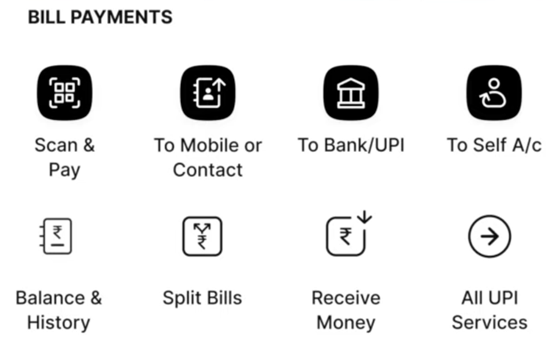
Make sure your bank account is linked and the app is working with your registered mobile number.
Step 2: Find the UPI PIN Settings
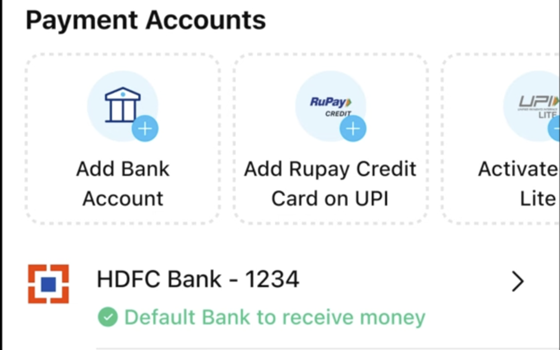
Go to your profile or settings and look for options such as Bank Accounts or UPI settings. Choose your linked bank account and select the option to manage or change your UPI PIN.
Step 3: Enter Your Current PIN

If you remember your existing PIN, enter it when asked. If you cannot recall it, use the “Forgot UPI PIN” option.
Step 4: Complete the Verification
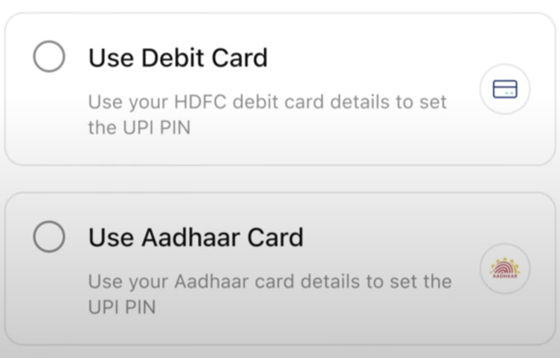
Some apps may ask for your debit card details or send an OTP to your registered number before finishing the process.
Step 5: Set Your New UPI PIN

Type in the new four or six-digit PIN and confirm it. Your app will update it immediately once the details match.
Tips for Choosing a Strong PIN
- Avoid predictable patterns like 1111 or 1234
- Keep it different from your ATM PIN
- Pick something simple enough to remember without writing it down
App-Specific Notes
- In Google Pay, the UPI PIN option appears inside the linked bank account section under your profile
- In PhonePe, it is available under My Money, then Bank Accounts
- In Paytm, you’ll find it under UPI and Payment Settings
Follow these steps once, and you’ll know exactly how to handle a PIN change on any UPI app.
How to Change UPI PIN Without a Debit Card
It’s possible to change your UPI PIN without using your debit card by using your Aadhaar-linked mobile number instead. Here is how the Aadhaar method works -
- Step 1 - Open your official UPI or banking app and select the bank account you want to update
- Step 2 - Look for the option to set or reset UPI PIN and choose the Aadhaar verification route.
- Step 3 - Enter the required Aadhaar digits shown on the screen
- Step 4 - You will receive two OTPs, one from your bank and one from UIDAI. Enter both to confirm your identity
- Step 5 - Once verified, create a new UPI PIN and confirm it
Also Read: How to Withdraw Cash Without an ATM Card
Security Reminders
- Use only trusted UPI or bank apps for this process.
- Make sure your mobile number is linked to both your bank account and your Aadhaar.
- Never share OTPs or your new PIN with anyone.
Tips to Keep Your UPI PIN Safe and Secure
If you’ve been wondering how to keep your UPI PIN protected, here are a few easy things you can do that really help -
- Never share your UPI PIN with anyone. No bank or app will ever ask for it.
- Skip obvious choices like birthdays, repeating numbers, or simple patterns.
- Keep your phone locked with a strong password or biometric lock.
- Turn on fingerprint or face unlock inside your UPI app if available.
- Check your bank statements and UPI history regularly.
If you manage most of your finances on your phone, you can also explore Hero Fincorp’s personal loan app for Android and iOS.
Also Read: How to Unblock UPI ID: A Step-by-Step Guide
Protect Your Payments and Explore Smarter Financial Options
Updating your UPI PIN doesn’t take long, but it goes a long way in keeping your payments secure and your day-to-day transfers trouble-free once you know the steps, changing or resetting it when needed feels simple and quick.
If you want the rest of your finances to feel just as easy, Hero Fincorp has you covered. Their loans are straightforward to apply for, and the online process for loans helps you get what you need without unnecessary delays.
Check out Hero Fincorp’s personal loan to see what you can qualify for in minutes.
Also Read: ATM Withdrawal Limit in India: Daily, Bank-wise & New Rules
Frequently Asked Questions
Can I change my UPI PIN easily without my old PIN?
In most apps like Google Pay, you need to enter your existing PIN to change it. If you can’t remember your old PIN, just use the “Forgot UPI PIN” or reset option in the app.
Can I set a 6-digit UPI PIN, or does it have to be four digits?
You can set either a 4-digit or a 6-digit UPI PIN, depending on your bank/app.
Is it safe to change UPI PIN via third-party apps?
Only use trusted apps from your bank or the main UPI platforms.
How frequently should I update my UPI PIN for optimal security?
There isn’t a strict rule, but updating a PIN every few months or whenever you suspect any issue is a sensible precaution.
How do I reset my UPI PIN if I forget it?
Open your UPI app, select the linked bank account, tap the “Forgot UPI PIN” option, complete verification, and create a new PIN securely.
What happens if I enter the wrong UPI PIN multiple times?
Entering the wrong UPI PIN repeatedly may temporarily block UPI transactions for security reasons. You may need to wait or reset the PIN.
Can I reset my UPI PIN without a smartphone or internet?
No. Resetting a UPI PIN usually requires access to a registered mobile number, a UPI-enabled app, and an active internet connection.
Is it safe to share my UPI PIN with others?
No. Your UPI PIN is confidential and should never be shared with anyone, including bank representatives or customer support executives.
Disclaimer: The information provided in this is for informational purposes only. While we strive to present accurate and updated content, travel conditions, weather, places to visit, itineraries, budgets, and transportation options can change. Readers are encouraged to verify details from reliable sources before making travel decisions. We do not take responsibility for any inconvenience, loss, injury, or damage that may arise from using the information shared in this blog. Travel involves inherent risks, and readers should exercise their judgment and caution when implementing recommendations.