CRN Number: Meaning & How to Find It

Akash sat down one evening to pay his taxes. He entered the amount, selected the assessment year, and went through the steps without really stopping to think. A reference number showed up just before the final payment, and he moved ahead as most people do.
A few days later, he wanted to check if the payment had been recorded properly. That is when he realised the portal needed that same number to pull up the details. He remembered seeing it, but he had not noted it down or paid attention at the time.
That small gap between making a payment and trying to track it is where most people get stuck. In this blog, you will understand what the CRN number is, why it matters, how to generate it, and where to find it when you need it.
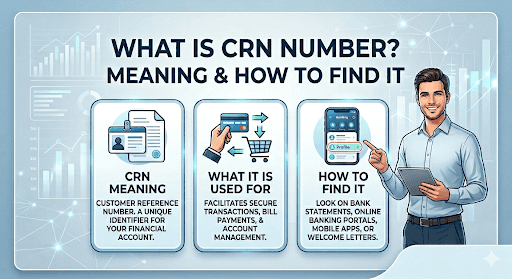
CRN Full Form and Meaning
Every tax payment needs a way to stay identifiable inside the system. This is where CRN plays a key role. The CRN full form is Challan Reference Number, and it acts as a unique identifier for each payment request.
Think of it as a tracking code that connects your payment details with the Income Tax Department’s records. This number ensures that your transaction stays linked to your account without any mix-up. A clear structure like this helps maintain accuracy throughout the payment process.
What is CRN in Income Tax?
Tax payments involve multiple details, including amount, assessment year, and payment category. Each detail must stay correctly aligned for the system to process your transaction without errors.
Understanding what CRN in income tax is helps you follow this process with clarity. The CRN number in the income tax system links your challan details to the final payment. Once the transaction goes through, this number helps confirm that the payment has been recorded correctly.
Significance of CRN in Income Tax
A CRN keeps your payment organised and easy to verify whenever required. It plays a direct role in maintaining accuracy and reducing confusion.
- It tracks each payment clearly from start to completion
- It connects the payment with the correct assessment year
- It reduces the chances of mismatched records
- It helps resolve issues quickly if discrepancies arise
- It supports proper documentation for future reference
How to Generate a CRN Number for Tax Payment?
You can generate a CRN in a few simple steps. The process remains structured whether you log into the portal or continue without logging in.
Also Read: How to Update Corrections on PAN Card Details Online?
Generating CRN via Income Tax e-Filing Portal (Post Login)
Step 1: You need to log in to the Income Tax e-Filing portal.
Step 2: Search for the e-pay tax option.
Step 3: Then, select the correct assessment year and choose the tax type
Step 4: Enter the payment amount and other information carefully.
Step 5: Review all entries to ensure accuracy.
Step 6: Submit the request to create your CRN.
Step 7: Proceed with payment using your preferred method.
Generating CRN Without Portal Login (Pre Login)
Step 1: You should open the e-pay tax page from the Income Tax portal
Step 2: Choose the option to continue without logging in.
Step 3: Enter your PAN and mobile number to move ahead.
Step 4: Add the OTP you receive on your phone.
Step 5: Enter the amount and the assessment year.
Step 6: Check the details once before you continue.
Step 7: Submit the form.
Payment Options After CRN Generation
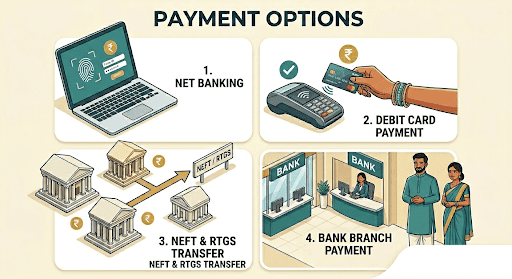
After generating your CRN, you can complete the payment using any of the available methods. Each option lets you complete the transaction securely.
- Net banking through authorised banks
- Debit card payment
- NEFT or RTGS bank transfer
- Payment at designated bank branches
How to Find Your CRN Number?
You will need your CRN to check whether your payment went through or to look up the details later. Not knowing where to find it can slow things down.
You can spot the CRN on the challan you created when making the payment, or in your transaction history on the portal. It helps to keep it saved somewhere so you do not have to search for it again.
Here are simple ways to find your CRN:
- Check the confirmation screen after creating the challan
- Download and review the challan receipt
- Access your transaction history on the Income Tax portal
- Review email or SMS confirmations sent to your registered details
- Check with your bank if you paid through net banking
Stay Clear and Confident While Managing Tax Payments
Understanding how CRN works gives you better control over your tax payments. When you know how your transaction gets tracked and where to find the details, you avoid confusion and handle your filings with more confidence.
The same clarity matters when you manage other financial needs. Choosing a trusted lender makes the process simpler from the start. Hero FinCorp offers personal loans with a smooth application process and clear terms, so you always know what to expect. You can use a reliable personal loan app to check eligibility criteria, track your application, and apply when you need funds without unnecessary hassle.
Frequently Asked Questions
Is the CRN form draft saved?
The system may briefly save your draft, but completing the process in a single session reduces the risk of losing details.
Can the same CRN be used for multiple payments?
Each CRN applies to a single transaction and cannot be reused.
Can CRN be generated for past assessment years?
You can generate a CRN for earlier years by selecting the correct assessment year during payment.
Can a generated CRN be modified?
Once created, the CRN cannot be changed. You need to generate a new one if the details are incorrect.
How long is CRN valid?
The CRN remains valid for a limited time until the payment session expires or the transaction is completed.
Is CRN mandatory for tax payment?
Yes, the system requires a CRN to process and track your payment accurately.
How long does it take for payment to reflect in Form 26AS or AIS?
It takes a few days for the payment to reflect in Form 26AS or AIS. It also depends on processing timelines and the method used.
Disclaimer: The information provided in this blog post is intended for informational purposes only. The content is based on research and opinions available at the time of writing. While we strive to ensure accuracy, we do not claim to be exhaustive or definitive. Readers are advised to independently verify any details mentioned here, such as specifications, features, and availability, before making any decisions. Hero FinCorp does not take responsibility for any discrepancies, inaccuracies, or changes that may occur after the publication of this blog. The choice to rely on the information presented herein is at the reader's discretion, and we recommend consulting official sources and experts for the most up-to-date and accurate information about the featured products.