Split Payments: What is it, Methods, How Does it Work & Uses


Split Bill Online: How to Share Expenses Easily
We share expenses all the time, from brunches and weekend trips to cab rides, OTT subscriptions, and even quick grocery runs. But the minute the bill arrives, confusion begins. Who owes what? Who paid last time? Who still hasn’t settled?
When you split the amount online, everything becomes easier. Instead of chasing people or doing manual math, you open your app, send requests, and track every share clearly. It’s quicker, cleaner, and makes settling shared costs simple. Let’s see how.
What Is a Split Bill?
A split bill online is a digital feature that lets you divide a shared expense among two or more people through your payment app. It calculates each person's share, either equally or based on individual usage, and sends a secure request so everyone can settle their part without confusion.
Benefits of Using Online Platforms for Splitting Bills
India's digital payments are booming, with transaction volumes rising at a 23% CAGR. Since we already tap, scan, and pay without thinking, bill splitting has become the stress-free way to settle shared costs. And honestly, it just makes life easier. Here's why -
- Get instant clarity on every person's share.
- Avoid awkward reminders because apps send them automatically.
- Settle payments within seconds using digital transfers.
- Track past payments with clear, accessible records.
- Choose fair splits, whether equal, percentage-based, or custom.
- Reduce emotional strain by keeping money conversations simple.
- Skip cash handling, rounding off, and misplaced contributions.
And if you are planning bigger expenses, you can take the same digital ease forward with Hero FinCorp. Check your personal loan eligibility instantly and see what fits your budget.
Different Methods to Split Expenses Online
Every shared expense has its own vibe, and that is exactly why apps give you more than one way to split the amount online. Whether you divide evenly, customize shares, or settle a past payment, each method keeps things simple and fair for everyone
| Method | Best for | How It Works | Why People Prefer It |
|---|---|---|---|
| Equal Split | Cab rides, meals, or quick group plans | The total amount is divided evenly among everyone | Fast, fair, and removes all mental math |
| Percentage Split | Rent, utilities, shared subscriptions, fuel | Each person pays a fixed percentage of the total | Matches real usage and keeps contributions transparent |
| Custom Amount | Shopping, travel costs, or shared items with different individual totals | Each person pays the exact amount they owe | Flexible when everyone's share is different |
| Split Existing Transaction | When one person pays upfront for the group | The payer selects a past payment and assigns each person's share | Prevents confusion and ensures no one forgets their part |
How to Split Expenses Online: A Clear Step-by-Step Guide
Digital bill splitting is straightforward once you know the flow. Follow this simple step-by-step guide to get it right every time.
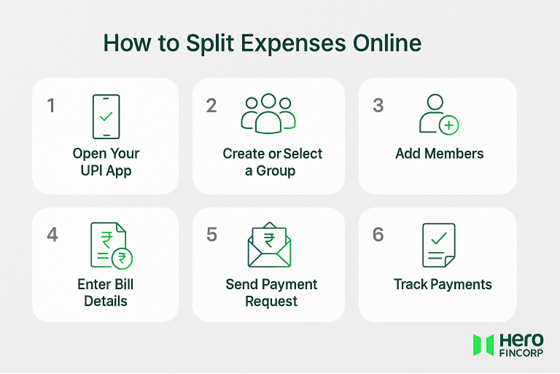
Step 1: Open Your Digital Payments App
Pick any UPI app you normally use for everyday transactions. Most of these now allow you to split expenses and send requests in seconds.
For example, on Paytm, open Balance & History, tap a specific payment, and select "Split this payment." Using Google Pay? Tap "Pay Anyone" to see the Split expense option.
Step 2: Create or Select a Group
Have a group already? If not, set up a new one and name it something everyone will recognise later. It makes repeated expenses easier to track.
Step 3: Add Group Members
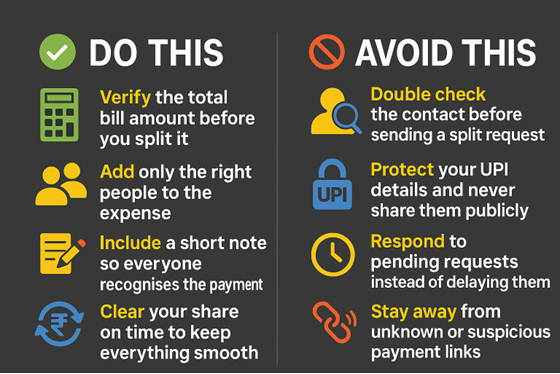
Add contacts from your phone. The app will show who is already using UPI. If someone is not on the same app, they can still pay using UPI links.
Step 4: Enter Bill Details and Choose Split Type
Add the total amount and choose how you want to split expenses. You can divide equally, by percentage, or enter custom amounts. Add a short note to make it easier for everyone to recognise the payment.
Step 5: Send Payment Request
Once the split looks correct, send the request. Each person receives a notification with their exact share. They can pay instantly using UPI or any other supported payment method.
Step 6: Track Payment Status and Send Reminders
As each person pays, the app updates the list instantly. You can see who is sorted and who might need a quick reminder, keeping the split moving without any awkwardness.
Pro Tip - UPI apps have daily transaction limits set by NPCI and your bank. For bigger group expenses, you might have to break the total into a couple of smaller transfers.
Split Today, Plan Better for Tomorrow
Sharing expenses online has turned everyday moments into smoother, fairer experiences. No confusion, no back and forth, just quick settlements that let you focus on the people.
But while shared bills come and go, life also brings moments that call for quick decisions. A sudden opportunity, a last-minute plan, or an upgrade you want right away. In times like these, having fast and reliable support makes all the difference.
That's where Hero FinCorp steps in with a transparent, digital-first loan process that gives you the confidence to take the next step when you need funds.
Start your personal loan journey and say yes to what comes next.
Frequently Asked Questions
1. Can I split a bill with someone who does not use the same app?
Yes. Most apps let you share a UPI payment link that works across platforms.
2. What happens if someone does not pay their split amount?
Your app will show their status as pending. You can send a reminder, and many apps also send automated nudges. The group can also manually adjust balances later.
3. Are there any charges for using online bill-splitting features?
No. Most UPI apps do not charge for split requests.
4. Is the feature available across India?
Yes, split requests work anywhere UPI works.
5. How do I track who has paid?
Your app will show a real-time list of paid and pending shares.