Paying with QR Codes: Know How It Works and Pay Safely
- What is a QR Code Payment?
- How Does Paying with QR Codes Work?
- Types of QR Codes Used in Payments
- Benefits of Paying with QR Codes via Mobile Banking
- Are QR Code Payments Safe?
- Common QR Code Payment Issues and Solutions
- QR Code Payments vs Card Payments
- How Hero FinCorp Supports Digital Payments
- Frequently Asked Questions
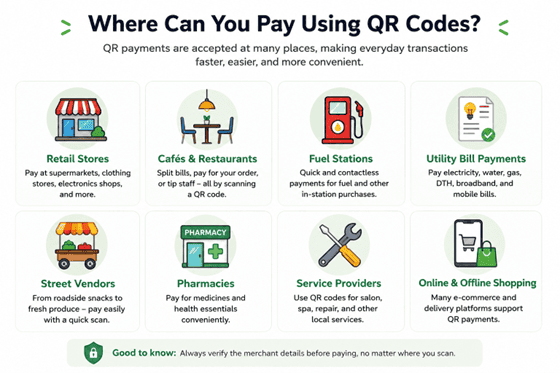
Paying with QR codes has become second nature for everyday purchases. Whether you're buying groceries, paying at a café or fuel station, clearing a utility bill, or shopping at a local store, it takes just a few taps on your phone.
But what actually happens after you scan? This guide explains how QR payments work, where you can use them, and the simple safety checks to follow every time.
What is a QR Code Payment?
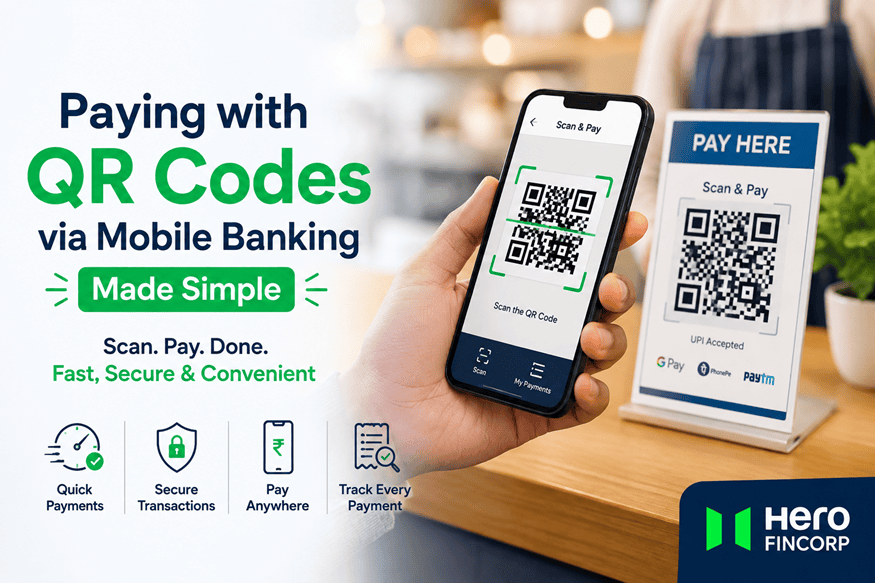
A QR code payment is a digital payment made by scanning a Quick Response code using a mobile banking or UPI app. The code contains the recipient's payment details, allowing the app to identify where the money should go without you entering bank information manually.
Also Read: Merchant QR Code: Meaning & How to Get
How Does Paying with QR Codes Work?
When you scan QR code payments with your banking app, it quietly sets up a secure, encrypted bridge between your account and the receiver's. It all runs safely through the UPI network without you ever needing to share your bank details.
Follow these simple steps:
- Open your mobile banking app.
- Select the "Scan & Pay" option.
- Point your camera at the merchant's QR code.
- Check the merchant or recipient name carefully.
- Enter the amount if it is not already filled in.
- Authorise the payment using your UPI PIN.
- Check the transaction status to confirm that the payment was successful.
Tired of switching between multiple banking apps? Use Hero FinCorp's UPI payment app on Android or iOS to link eligible bank accounts, scan QR codes, and manage payments from one place.
Types of QR Codes Used in Payments
Not all QR codes are the same. Some stay fixed for repeated payments, while others are created fresh for each transaction. Here's how the common types differ.
| Type | How it works | Common use cases |
|---|---|---|
| Static QR | Uses fixed merchant details; you enter the amount | Kirana stores, cafés, street vendors |
| Dynamic QR | Generated for each transaction, often with the amount pre-filled | Supermarkets, restaurants, billing counters |
| UPI QR | Links directly to UPI payments | Shops and person-to-person payments |
| Bharat QR | Works across compatible banking and payment apps | Retail and merchant outlets |
| Merchant QR | A general QR used by businesses to accept payments | Stores, pharmacies, service counters |
Benefits of Paying with QR Codes via Mobile Banking
The global QR codes market hit $13.04 billion in 2025, with payments and transactions making up 45.19% of revenue. Their popularity comes down to a few practical benefits:
- Pay in seconds using your smartphone, without carrying cash or cards.
- Authorise payments securely using your UPI PIN or other app authentication.
- Pay conveniently at neighbourhood stores as well as larger retail outlets.
- Track every rupee spent directly through your mobile banking app history.
- Go completely green with paper-free, contactless payments.
Are QR Code Payments Safe?
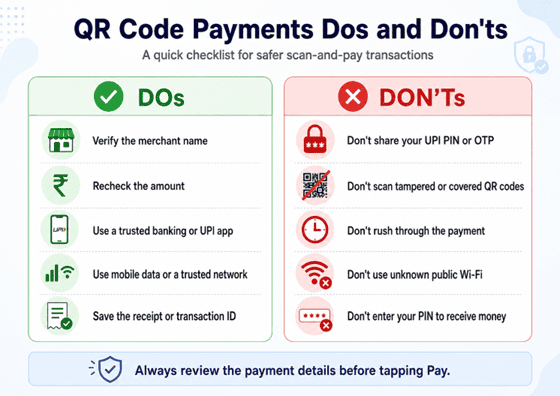
QR payments are generally safe when you use a trusted banking or UPI app and check the details before you approve the transaction. Still, always keep these simple checks in mind:
- Match the recipient name and amount with what you expect to see.
- Keep all your credentials (UPI PIN, OTPs and bank passwords) private.
- Use mobile data or secure Wi-Fi instead of open public networks.
- Check for tampered stickers or QR codes pasted over original ones.
- Keep the transaction ID handy until the payment shows as successful.
Pro Tip: You need your UPI PIN to send money, not to receive it. If someone asks for your PIN to "accept" a payment, don't proceed.
Common QR Code Payment Issues and Solutions
Here's how to fix the most common QR payment hiccups:
| Issue | What to do |
|---|---|
| QR code won't scan | Clean camera lens, improve the lighting, or ask for another code |
| Payment fails | Check your internet connection and account balance before retrying |
| Payment stays pending | Wait and check the transaction status before paying again |
| Wrong amount entered | Inform the merchant immediately and request a refund if needed |
| Duplicate payment | Check your transaction history and raise a complaint through your app |
| Merchant QR unavailable | Ask for another authorised payment option |
QR Code Payments vs Card Payments
Both options offer fast, cashless convenience, but the experience is slightly different:
| Feature | QR Code Payment | Card Payment |
|---|---|---|
| Payment method | Scan and pay | Tap, swipe, or insert |
| What you need | Phone and banking or UPI app | Debit or credit card |
| Authentication | UPI PIN | PIN, OTP, or contactless approval |
| Contactless | Yes | Available on supported cards |
| Payment record | Stored in app history | Shown in card/bank statement |
How Hero FinCorp Supports Digital Payments
Paying with QR codes makes everyday transactions quick and convenient, but security always starts with you. Always verify the merchant, review the amount, and stick to trusted UPI or banking apps before approving a payment.
Hero FinCorp extends that digital convenience beyond everyday shopping. Through authorised online channels and secure payment options, eligible customers can manage their accounts and repayments with fewer steps and absolute peace of mind.
Planning something bigger? Explore our quick personal loan options to explore smart solutions with a trusted partner that grows with you.
Frequently Asked Questions
What is a QR code payment?
A QR payment allows you to transfer funds digitally by scanning a Quick Response code. The code stores merchant details, letting your mobile banking or UPI payment app process the transaction instantly.
How do I pay using a QR code?
Scan the code, check who you're paying, enter the amount if required, and confirm with your UPI PIN.
Do QR payments need internet?
Yes, standard QR payments generally need mobile data or Wi-Fi to go through.
Can my UPI or QR payment history help with a personal loan?
It can. Some lenders may consider digital cash flow, utility bills or UPI payments alongside other eligibility checks, especially for applicants with limited credit history.
Are there any charges for paying with QR codes?
No, most banks and NBFCs like Hero FinCorp offer QR and UPI payments at no extra cost.
Disclaimer: The information provided in this blog post is intended for informational purposes only. The content is based on research and opinions available at the time of writing. While we strive to ensure accuracy, we do not claim to be exhaustive or definitive. Readers are advised to independently verify any details mentioned here, such as specifications, features, and availability, before making any decisions. Hero FinCorp does not take responsibility for any discrepancies, inaccuracies, or changes that may occur after the publication of this blog. The choice to rely on the information presented herein is at the reader's discretion, and we recommend consulting official sources and experts for the most up-to-date and accurate information about the featured products.