UPI AutoPay vs eNACH for Personal Loans: Key Differences, Benefits & Which is Better?
- What is UPI AutoPay?
- What is eNACH?
- UPI AutoPay vs eNACH: Key Differences
- How Does UPI AutoPay Work for Personal Loan EMIs?
- How Does eNACH Work for Personal Loan Repayments?
- Benefits of Using UPI AutoPay
- Benefits of Using eNACH
- UPI AutoPay vs eNACH: Which is Better for Personal Loan EMI Payments?
- How to Set Up Auto EMI Payments for a Personal Loan
- Common Reasons for Auto-Debit Failures
- Hero FinCorp Digital EMI Repayment Options
- Frequently Asked Questions
Once your loan is approved, one small decision follows: how the EMI leaves your account each month. The Personal Loan eNACH vs UPI AutoPay choice looks minor, yet the two work quite differently.
What is UPI AutoPay?
UPI AutoPay is a recurring payment mandate you set up inside any UPI app. Launched by NPCI in July 2020 under UPI 2.0, it lets you approve a repeating payment once with your UPI PIN, after which scheduled debits run on their own. You see the amount and dates before approving, and a notification arrives ahead of each debit.
What is eNACH?
eNACH, short for Electronic National Automated Clearing House, is the digital version of the old paper mandate. You authorise your bank once through net banking, debit card details or an Aadhaar based eSign, and your lender can then debit the EMI on each due date. It runs on NPCI's NACH network, which is what most banks and NBFCs use for loan collections.
UPI AutoPay vs eNACH: Key Differences
| Basis | UPI AutoPay | eNACH |
|---|---|---|
| Set up through | Your UPI app | Net banking, debit card or Aadhaar eSign |
| Authorisation | UPI PIN | Bank credentials or Aadhaar OTP |
| Debited from | Your UPI linked account | Your bank account directly |
| Amount ceiling | ₹15,000 per debit runs hands free | Set by the mandate itself |
| Above that ceiling | You approve each debit with your PIN | Continues automatically |
| Managing it | Pause, edit or cancel in the app | Through your bank or lender |
| Reach | Needs a UPI enabled account | Supported by most banks |
How Does UPI AutoPay Work for Personal Loan EMIs?
Your loan is approved, and the lender raises a mandate request carrying the EMI amount, frequency and validity period. It lands in your UPI app, where you check the details and approve once with your PIN. The EMI is then deducted on schedule, with a notification before each debit.
How Does eNACH Work for Personal Loan Repayments?
You register the mandate during the loan journey, authenticating through net banking, your debit card or an Aadhaar eSign. Your bank verifies it and NPCI registers it against a unique mandate reference number. On each due date the lender presents the debit, your bank releases the EMI, and a confirmation follows.
Benefits of Using UPI AutoPay
- Set up in minutes inside an app you use daily.
- No manual payments, since approved debits run on their own.
- Timely repayment that protects your credit record.
- Easy management, since you can pause, edit or cancel it yourself.
- Advance notifications before money leaves.
- Secure authorisation, since only your UPI PIN creates the mandate.
Benefits of Using eNACH
- Direct bank debit, independent of any app or UPI cap.
- Reliable for larger EMIs, as the mandate sets the ceiling.
- Fewer missed payments, keeping penalties and credit damage away.
- Paperless registration, no forms or branch visits.
- Wide bank compatibility.
- Set and forget servicing across the full tenure.
UPI AutoPay vs eNACH: Which is Better for Personal Loan EMI Payments?
On setup and everyday convenience, UPI AutoPay wins comfortably. It takes minutes, sits in an app you open anyway, and you manage the mandate yourself.
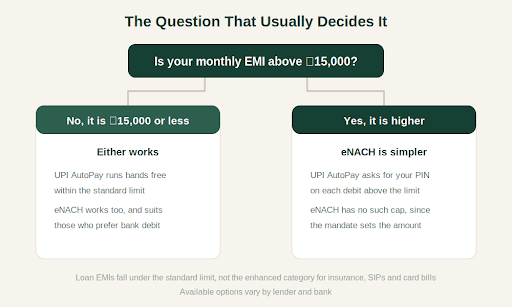
One detail usually settles it. UPI AutoPay clears debits up to ₹15,000 without further authentication, and anything above needs your PIN each time. Higher ceilings exist, though they cover insurance premiums, SIPs and card bills rather than loan EMIs. At a Personal Loan Interest Rate of 18% per annum, a ₹2 Lakh loan over 12 months means an EMI near ₹18,336, needing approval every month.
eNACH carries no such ceiling, because the mandate sets the maximum. That makes it steadier for larger EMIs, while UPI AutoPay suits smaller ones. Your lender and bank decide what is actually on offer.
How to Set Up Auto EMI Payments for a Personal Loan
- Choose the mandate your lender offers during the loan journey.
- Complete the authentication, whether UPI PIN, net banking or Aadhaar OTP.
- Approve it after checking the amount and dates.
- Confirm the mandate shows as registered.
- Keep enough balance before each due date.
- Watch the repayment status each month.
Common Reasons for Auto-Debit Failures
Mandates fail occasionally, and most causes are avoidable:
- Not enough balance on the due date, by far the most common reason
- A mandate that has passed its validity period
- Technical issues at the bank
- Incorrect account details at registration
- A blocked or deactivated UPI ID
- A mandate paused or cancelled, then forgotten
- Daily transaction limits, where your bank applies them
Keep the balance ready a day early, check the mandate validity covers your tenure, and act on any failure notice quickly, since a bounce brings a charge and a credit record mark.
Hero FinCorp Digital EMI Repayment Options
Hero FinCorp offers digital repayment options for eligible borrowers, with mandate registration handled online, a repayment schedule visible upfront, online account access and customer support. Do review the methods available to you while applying. You can check what you qualify for using the Personal Loan Eligibility Calculator, explore an instant personal loan, or use the Personal Loan App on Android and iOS.
Ready to begin? Check your eligibility in minutes.
Frequently Asked Questions
What is UPI AutoPay?
It is a recurring payment mandate created inside a UPI app. You approve the instruction once with your UPI PIN, and scheduled payments such as EMIs, subscriptions and bills are then debited automatically on their due dates.
What is eNACH?
eNACH stands for Electronic National Automated Clearing House. It is a digital mandate authorising your lender to debit EMIs from your bank account on scheduled dates, registered through net banking, a debit card or an Aadhaar based eSign.
What is the difference between UPI AutoPay and eNACH?
UPI AutoPay is created and managed in your UPI app and runs hands free up to ₹15,000 per debit. eNACH is registered with your bank, debits the account directly, and carries no fixed ceiling because the mandate sets the amount.
Which is better for personal loan EMI payments: UPI AutoPay or eNACH?
It depends on your EMI. UPI AutoPay is quicker to set up and easier to manage, which suits smaller EMIs. For amounts above ₹15,000, eNACH avoids monthly authentication. Your lender and bank determine which options you can actually choose from.
How does UPI AutoPay work?
Your lender sends a mandate request showing the amount, frequency and validity. You approve it once in your UPI app using your PIN. Debits then run on schedule, with a notification before each one, and you can pause or cancel anytime.
Disclaimer: The information provided in this blog post is intended for informational purposes only. The content is based on research and opinions available at the time of writing. While we strive to ensure accuracy, we do not claim to be exhaustive or definitive. Readers are advised to independently verify any details mentioned here, such as specifications, features, and availability, before making any decisions. Hero FinCorp does not take responsibility for any discrepancies, inaccuracies, or changes that may occur after the publication of this blog. The choice to rely on the information presented herein is at the reader's discretion, and we recommend consulting official sources and experts for the most up-to-date and accurate information about the featured products.