UPI 123 Pay: Digital Payments Without Internet
- What is UPI 123 Pay?
- How to Set Up UPI 123 Pay on Feature Phones
- Methods to Make Payments Using UPI 123 Pay
- Key Benefits of UPI 123 Pay
- Business Benefits of UPI 123 Pay
- Differences Between UPI 123 Pay and Regular UPI
- UPI 123 Pay Transaction Limits and Charges
- Conclusion
- Frequently Asked Questions
- What is UPI 123Pay, and how does it work?
- Can I use UPI 123Pay without internet or a smartphone?
- What are the different methods available to use UPI 123Pay?
- What is the transaction limit for UPI 123Pay payments?
- How can users register for UPI 123Pay?
- Is UPI 123Pay secure for making digital payments?
- Do all banks support UPI 123Pay in India?
- Can users send money using UPI 123Pay?
Anit Prayag is a private university lecturer who conducts seminars in different cities. During one of his trips, he visited a café in a rural area with poor internet connectivity. Anit’s UPI apps would not load, and he was unable to make a digital payment.
Even today, some regions face internet connectivity issues. In such scenarios, using UPI 123 Pay to make a UPI without internet connectivity is very useful.
Developed exclusively for feature phone users and countries with limited connectivity, the system enables users to make digital payments via IVR or missed calls. UPI 123 Pay allows users to send money and make payments without using a smartphone or internet connectivity.

What is UPI 123 Pay?
UPI 123 Pay is a payment service introduced by the NPCI - National Payments Corporation of India, for phone users to help them use the Unified Payments Interface offline.
The system allows UPI without internet connectivity using voice calls, USSD conversations, or other offline solutions. Users can make payments by calling a service number, using voice calls, and confirming payments with a secure UPI PIN, without a smartphone.
The system helps make digital money transfers, pay merchants, and check account balances. 123 UPI pay number fills the gap between traditional modes and digital payments.
How to Set Up UPI 123 Pay on Feature Phones
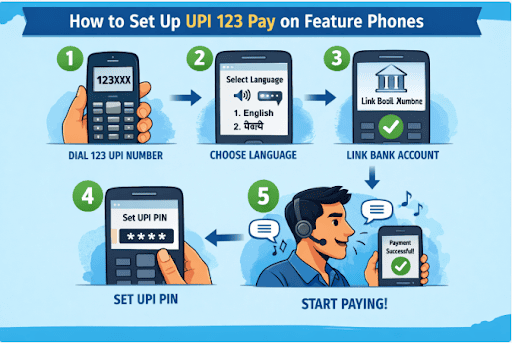
Setting up UPI 123 Pay is simple:
Step 1 - Dial the 123 UPI pay number as given by your bank or UPI service.
Step 2 - Select the language from the IVR menu.
Step 3 - Link your mobile number to your bank account.
Step 4 - Select a UPI PIN to verify transactions.
Step 5 - After registration is complete, start making payments or checking balances using voice instructions.
The 123 UPI Pay number works on feature phones, provided the mobile number is registered with the bank account linked to UPI.
Methods to Make Payments Using UPI 123 Pay
UPI 123 Pay supports several payment methods, especially in low-connectivity environments:
1. IVR-Based Payments
Users can dial the 123 UPI pay number and follow an IVR system. The system guides users through:
- Sending money
- Checking account balance
- Viewing recent transactions
2. Missed Call Payments
Another option for UPI without the internet is missed-call-based transactions.
Users place a missed call to a dedicated service number. The system then calls back with instructions that help users complete the payment process via keypad entry.
Users don't need a smartphone or internet connectivity.
3. OEM-Embedded Apps
Some feature phones come with embedded payment apps that support UPI 123 Pay.
These apps enable customers to make transactions through a simplified interface.
4. Sound-Based Technology Payments
UPI 123 Pay also supports sound-based payments, where encrypted audio signals help complete transactions.
In this method:
- The merchant device emits a secure sound signal.
- The user’s phone recognises the signal and confirms the transaction.
Key Benefits of UPI 123 Pay
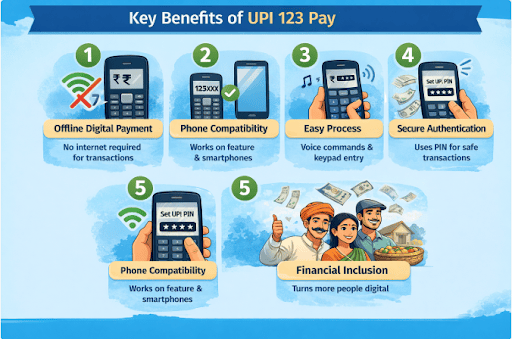
UPI 123 Pay offers several advantages for users who do not rely on smartphones:
- Offline digital payment - Users can make UPI payments without internet.
- Phone compatibility - UPI 123 Pay works on normal and smartphones without requiring extensive mobile apps or data plans.
- Easy process - Voice commands and keypad entry make it easy for customers to make transactions.
- Secure authentication - UPI payment without internet works securely using PIN.
- Financial inclusion - It helps people become a part of India’s digital payment ecosystem.
Business Benefits of UPI 123 Pay
For small businesses and local vendors, UPI 123 Pay increases the customer base as vendors and service providers can receive payments from customers who do not have smartphones. This helps reduce cash handling and transaction tracking.
Differences Between UPI 123 Pay and Regular UPI
| Feature | UPI 123 Pay | Regular UPI |
|---|---|---|
| Device requirement | Works on feature phones | Requires smartphone |
| Internet requirement | Supports UPI without internet | Requires internet |
| Transaction method | IVR, missed call, sound-based | Mobile apps |
| Setup process | Dial 123 UPI pay number | App registration |
| User interface | Voice or keypad navigation | Graphical mobile interface |
UPI 123 Pay Transaction Limits and Charges
UPI 123 Pay transactions follow certain limits:
| Transaction | Limit |
|---|---|
| Maximum transaction value | Up to INR 5,000 per transaction (depends on the bank and the UPI service provider) |
| Payment method | IVR, missed call, sound-based |
| Authentication | UPI PIN verification |
Also Read: UPI Risk Policy: Navigating New Rules and Staying Secure in 2026
Conclusion
UPI 123 Pay enables digital payments even without using smartphones or internet connectivity. This helps more people manage daily expenses, small businesses, or even home finances. It can simplify money management.
When larger financial needs arise, you can opt for flexible loan options. Check your Hero FinCorp’s personal loan eligibility in minutes here digitally using the Hero FinCorp Digital Lending App Android/iOS.
Hero FinCorp’s instant personal loan journey can help manage short-term financial needs.
Frequently Asked Questions
What is UPI 123Pay, and how does it work?
UPI 123Pay is an offline payment service that helps users make digital payments using IVR calls, missed calls, or sound technology.
Can I use UPI 123Pay without internet or a smartphone?
Yes. UPI payment without internet is possible via IVR or missed call services.
What are the different methods available to use UPI 123Pay?
Payments can be made via IVR calls, missed call services, OEM-embedded apps, and advanced payment technology.
What is the transaction limit for UPI 123Pay payments?
The transaction limit is INR 5,000 per transaction, subject to policies.
How can users register for UPI 123Pay?
The user must call the 123 UPI pay number, link the account, and create a secure UPI PIN.
Is UPI 123Pay secure for making digital payments?
Yes. UPI PIN authentication enables secure payments.
Do all banks support UPI 123Pay in India?
Major banks connected to the UPI network support this service. Availability may vary.
Can users send money using UPI 123Pay?
Yes. The user can send money to UPI IDs, bank accounts, or mobile numbers that are registered with the UPI network.
Disclaimer: The information provided in this blog post is intended for informational purposes only. The content is based on research and opinions available at the time of writing. While we strive to ensure accuracy, we do not claim to be exhaustive or definitive. Readers are advised to independently verify any details mentioned here, such as specifications, features, and availability, before making any decisions. Hero FinCorp does not take responsibility for any discrepancies, inaccuracies, or changes that may occur after the publication of this blog. The choice to rely on the information presented herein is at the reader's discretion, and we recommend consulting official sources and experts for the most up-to-date and accurate information about the featured products.