Net Banking: Meaning, Advantages, Disadvantages, Features, and More
Rekha uses UPI for most of her payments. It is quick and works well for her daily work. Last week, she needed to pay a new vendor to avoid delaying a client order. The vendor did not have a UPI ID, and waiting was not an option.
Rekha logged into her bank account and transferred the money directly to the vendor using net banking. The bank processed the payment without any issue. The delivery stayed on time, and her work moved ahead smoothly.
When you understand it, you handle payments without stress, even when simple options fall short.
What Is Net Banking?
Net banking is the process of managing your bank account online. Instead of going to a branch and filling out forms, you log in online and do the same work from your phone or computer. You can check your balance, send money, pay bills, and manage requests online.
Traditional banking still works the same way. You visit the branch, wait for your turn, and speak to someone for help. Net banking does not replace that system. It's simply a better alternative, especially for everyday tasks that do not need personal assistance.
Key Features and Benefits of Net Banking
Most features make everyday banking tasks easier.
24/7 Access to Bank Accounts
Net banking lets you check your balance or recent transactions whenever you need to. The best part? You can send money anytime via IMPS (Instant) or NEFT (Batch) and complete transactions without waiting in queues or filling out forms.
Easy Money Transfers
Sending money through NEFT, RTGS, or IMPS becomes a simple process. You choose the option based on how fast the money needs to reach the other person, and the rest happens online.
Most importantly, many online transactions have lower charges or no fees at all compared to branch-based services.
Also Read: How to Transfer Money Without UPI:
Bill Payments and Routine Recharges
Electricity bills, mobile recharges, and other regular payments can be done from the same place. Many people like this because it reduces missed due dates and last-minute stress.
Account Statements and Passbook Downloads
Net banking allows you to download statements for any time period. You can use this to track spending, prepare tax documents, or share records for a loan.
Basic Service Requests Without Visiting the Branch
Things like stopping a cheque, requesting a new cheque book, or blocking a card can be done online. This removes the need to visit the bank for tasks that do not need face-to-face support.
Works on Both Mobile and Desktop Devices
Most platforms are designed to be user-friendly on phones as well as computers, so you can use net banking in a way that feels comfortable. If you have a savings account, a salary account, or even a loan account, net banking lets you track everything in one place without confusion.
Security Features are Built into Every Step
You can protect logins and transactions using OTP verification, encryption, and two-factor authentication. These security features protect your account while you use net banking. Plus, SMS and email notifications keep you informed about every transaction. This helps you notice unusual activity quickly and stay in control.
How to Do Net Banking: Step-by-Step Registration & Login Process
If you have never used net banking before, the first question is usually not about features. It is about how to start without making a mistake. Banks have kept the process fairly simple, whether you register offline or online.
Step 1: Register Through the Bank Branch or Phone Banking
Visit your bank branch and request to activate net banking. The staff verifies your identity and guides you through the process.
Some banks also allow registration through phone banking, where basic details are confirmed before access is enabled. This option suits people who prefer in-person support at the start.
Step 2: Log in For The First Time and Set Things Up
The system asks you to change your password or set security questions during the first login. Take a few minutes to do this carefully. It helps protect your account and avoids issues later.
You can also use this step to check whether alerts and notifications are enabled.
Step 3: Follow Simple Security Habits From the Start
While learning how to do net banking, security matters just as much as convenience. Always create a strong password and avoid sharing it with anyone. Banks never ask for login details through calls, messages, or emails.
Once you get past the first login, using net banking usually feels much easier than people expect.
Limitations and Disadvantages of Net Banking
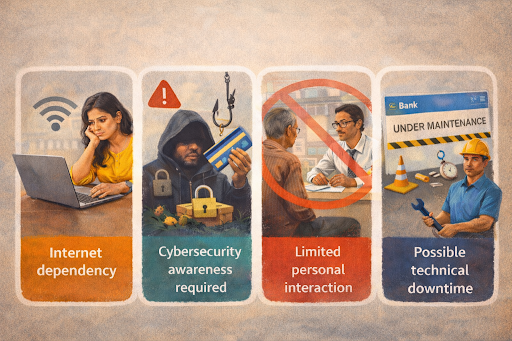
Users must remain alert to online fraud attempts. Some customers still prefer face-to-face guidance for complex issues. Occasional technical maintenance may also affect access.
- Internet dependency
- Cybersecurity awareness required
- Limited personal interaction
- Possible technical downtime
Users must remain alert to online fraud attempts.
Safety Tips for Secure Net Banking
As a first-time user, you may feel overwhelmed using net banking, but a few mindful habits can make it much safer and easier to use. It is less about being tech-savvy and more about staying aware while you bank online.
Keep Your Password Personal and Practical
Choosing something that is not obvious and keeping it to yourself goes a long way. Treat your net banking password with the same care as your ATM PIN.
Respect the Extra Security Steps
OTPs may feel like an extra step, but they are there to protect you. That second confirmation often stops unauthorised access in its tracks.
Be Cautious About Where You Log In
Public Wi-Fi is convenient, but not always secure. A trusted home network or mobile data usually offers more peace of mind.
Pause When Something Feels Urgent or Alarming
Messages or calls that rush you into sharing details are a red flag. Banks never ask for sensitive information this way.
Check In on Your Account Occasionally
A quick look at alerts or statements now and then helps you spot anything unusual early, before it becomes stressful.
Dos and Don’ts for Secure Net Banking
Do
- Use a password that is hard to guess and keep it to yourself
- Keep OTP and other security checks enabled
- Log out after using net banking, especially on shared devices
- Check alerts and statements occasionally
Don’t
- Share passwords, PINs, or OTPs with anyone
- Use net banking on public or unsecured Wi-Fi
- Click links or respond to messages claiming to be from your bank
- Ignore transactions that you do not recognise
Making Net Banking Work for You
Once net banking makes sense, it no longer feels like something technical or unfamiliar. It becomes a simple way to stay in control of everyday money tasks, without planning visits or adjusting your schedule. You gain that comfort when you understand how net banking works and use it with confidence.
This clarity also helps when financial needs grow beyond daily transactions.
Whether it’s business payments, urgent bills, or planned expenses, net banking helps you move money, but sometimes you need more.
Hero FinCorp personal loans offer quick approvals, minimal paperwork, and predictable EMIs to support you when it counts.
Apply online and stay in control!
Frequently Asked Questions
Can I use net banking without visiting the branch?
Yes. Most banks allow online registration using your account and registered mobile number.
Is net banking free in India?
Basic services are usually free. Some advanced services may have charges.
What to do if I forget my net banking password?
Use the password reset option on your bank’s website or app.
How secure is net banking against hacking?
Banks use encryption and two-factor security, but safe use depends on user awareness.
Can I manage multiple bank accounts with one net banking login?
Each bank usually provides a separate login for its accounts.
What is the difference between net banking and mobile banking?
Net banking works on websites and apps, while mobile banking focuses mainly on smartphone apps.
Disclaimer: The information provided in this blog post is intended for informational purposes only. The content is based on research and opinions available at the time of writing. While we strive to ensure accuracy, we do not claim to be exhaustive or definitive. Readers are advised to independently verify any details mentioned here, such as specifications, features, and availability, before making any decisions. Hero FinCorp does not take responsibility for any discrepancies, inaccuracies, or changes that may occur after the publication of this blog. The choice to rely on the information presented herein is at the reader's discretion, and we recommend consulting official sources and experts for the most up-to-date and accurate information about the featured products.