UPI Registration Failed? Here’s What’s Really Going On?

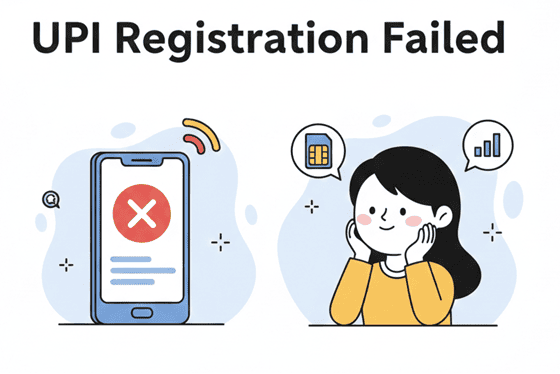
One of the primary reasons why UPI is so popular is its convenience: All you need to do is open the app, scan a QR, enter the pin, and boom, it's done. That said, as is the case with every piece of tech, some issues do pop up from time to time, and one of the most common errors is the UPI device Registration failed.
While this error does sound serious and technical, you don't need to panic. In reality, most UPI registration issues are simply verification problems, and in this post, we will walk you through how to fix this in a jiffy.
What Causes UPI Registration Failure?
When UPI registration fails, it usually means the app could not verify your device or mobile number with your bank. This is because for UPI, as a security measure checks if the mobile number on your phone must be the same one linked to your bank account.
To confirm this, the app sends an SMS from your SIM. If that doesn't happen, the error pops up. The following are some of the more common triggers as to why this could happen:
- The SIM is not linked to your bank account.
- Your prepaid plans have run out of their SMS balance.
- Weak mobile signal or the phone is in Airplane mode (UPI needs an active connection to function).
- Confusion in the case of dual SIMs i.e the SIM not linked to the bank account has been selected as the default to send messages.
- Your UPI app can be outdated.
- SMS or phone permissions may have been disabled.
- If you changed your device or SIM recently, re-verification is required.
Sometimes the issue is not your phone at all. The servers of your bank or NPCI could be down, causing the same problem.
Step-by-Step Guide: How to Verify Your Device for UPI Payment
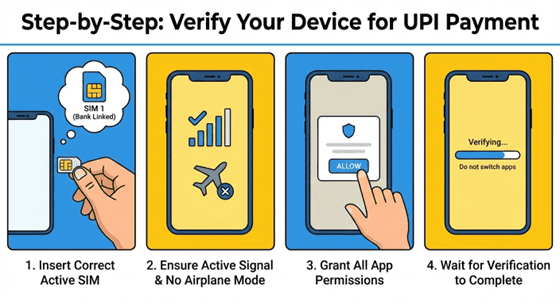
Now, if you want to know how to verify a device for UPI payment, follow these steps carefully:
Insert the SIM linked to your bank account into your phone (make sure it is active and has SMS service). If you have a dual SIM phone, make sure this SIM is selected as the default to send SMS.
- Make sure your phone is not in airplane mode and has good reception.
- Grant all required permissions to the UPI app.
- Open the app and begin registration.
- Select the correct SIM if prompted.
- Wait without switching apps while verification completes.
If you have done all the above steps correctly, the process should be complete in under a minute.
Note: If you have just changed phones, you will have to install the app and go through this process again.
What Do You Do If The Problem Still Persists?
In some cases, you may still see the same error popping up. Try the following fixes:
- Restart your phone.
- Clear the app cache.
- Update the UPI app.
Reinsert the SIM card and double-check whether SMS services are active on it. If yes, it could be a problem with the SIM itself.
Most of the time, these steps will fix the error. If not, wait a few hours and try again. The issue might be with the bank or the NCPI servers.
Bonus Tips To Make The UPI Registration Go Through Smoothly
Here are a few tips and tricks to ensure that your UPI registration sails through in one go.
- Keep only one active SIM during registration.
- Avoid using call-blocking or SMS-filtering apps.
- Maintain sufficient balance in case of a prepaid SIM.
- Keep your phone and the app updated.
- Complete verification in one go without interruptions
Resolving Your UPI Registration and Device Verification
A UPI registration failed error is really not a big deal. It's a small technical glitch that you can fix in a matter of minutes. So the next time you see this when you are in line to make a payment, don't fret. Just step aside, follow the steps in this post, and you will be back in line in no time.
There are times when you may need access to emergency funds as easily as fixing this error. Hero Fincorp can help you out in these exact situations. You can borrow funds via an instant loan app via a fully digital process, and the funds reach your account in under 24 hours. No trips to the bank required.
Frequently Asked Questions
Why does UPI device registration fail repeatedly?
Repeated failures often occur due to SIM mismatch, lack of SMS balance, or outdated/incorrect bank-linked mobile details.
How can I verify my device for UPI payment on dual SIM phones?
Make sure the SIM linked to your bank is set as the default for SMS and mobile data before starting registration.
What if my mobile number linked to the bank is changed?
You must update the new number with your bank first. UPI registration will not work until the records match.
How do I reset UPI registration on my device?
Uninstall the UPI app, reinstall it, and repeat the registration process using the linked mobile number.
Who should I contact if device verification keeps failing?
Contact your bank’s customer care or the UPI app’s support team for assistance.
Can I complete UPI registration without SMS verification?
No. SMS verification is mandatory for security purposes.
Disclaimer: The information provided in this blog post is intended for informational purposes only. The content is based on research and opinions available at the time of writing. While we strive to ensure accuracy, we do not claim to be exhaustive or definitive. Readers are advised to independently verify any details mentioned here, such as specifications, features, and availability, before making any decisions. Hero FinCorp does not take responsibility for any discrepancies, inaccuracies, or changes that may occur after the publication of this blog. The choice to rely on the information presented herein is at the reader's discretion, and we recommend consulting official sources and experts for the most up-to-date and accurate information about the featured products.