RC Download: Download Vehicle Registration Certificate (RC) Online

- What Is a Vehicle Registration Certificate (RC)?
- How to Download RC Online
- How to Download RC Using DigiLocker
- How to Download RC Using the mParivahan App
- Documents Required to Download RC
- Information Available on a Vehicle RC
- Benefits of Downloading a Digital RC
- Is a Digital RC Valid?
- Common Reasons Why RC Download Fails
- How to Apply for a Duplicate RC
- Difference Between Physical RC and Digital RC
- When Do You Need an RC?
- Tips to Keep Your RC Safe
- Frequently Asked Questions
Lost the physical RC, or tired of carrying it around? Knowing how to download RC of vehicle records, car or bike, works the same way: DigiLocker, mParivahan, or the Parivahan portal. How to download bike RC online specifically follows the identical steps. Once it's pulled from the Vahan database, it's legally valid.
What Is a Vehicle Registration Certificate (RC)?
An RC proves a vehicle is legally registered, and that you're the one it's registered to. Mandatory under the Central Motor Vehicles Rules; driving without one is an offence.
On it: your name, registration number, engine and chassis numbers, vehicle class, fuel type, and validity.
How to Download RC Online
How to download RC online: pick one of these three routes.
- Have your registration number ready. That's the one detail every method needs.
- Choose a platform: DigiLocker, mParivahan, or the Parivahan Sewa portal directly.
- Verify with OTP, sent to the mobile number linked to the vehicle.
- Download the PDF once your details match what's on record.
Online RC download takes minutes if your registered mobile number still works. If it's changed and never updated, that's usually where people get stuck.
How to Download RC Using DigiLocker
DigiLocker pulls your RC straight from government records:
- Log in with your DigiLocker ID or Aadhaar-linked mobile number.
- Open 'Issued Documents.'
- Select 'Ministry of Road Transport and Highways.'
- Fetch your RC using the registration number.
- Save or share the PDF, both count as valid.
Once it's in your DigiLocker, it stays there. No re-downloading before every trip.
How to Download RC Using the mParivahan App
mParivahan does much the same job, no browser needed:
- Download the app, Android or iOS.
- Register your mobile number.
- Add your vehicle.
- View your RC, stored for offline access.
The offline part matters more than it sounds. A traffic stop in an area with patchy signal doesn't leave you stuck waiting for a page to load.
Documents Required to Download RC
Nothing to scan or upload, just details you already have:
- Vehicle registration number
- Registered mobile number, for OTP
- Aadhaar-linked account, if using DigiLocker
- Chassis number, sometimes asked as a second check
Information Available on a Vehicle RC
What's on the certificate:
- Registration number and date
- Owner's name
- Vehicle class and fuel type
- Engine and chassis numbers
- Registration validity
- Insurance details, on some state formats
Benefits of Downloading a Digital RC
A few real advantages over the paper copy:
- Nothing to physically lose. Lives on your phone, not a glovebox.
- Instant access at a traffic check.
- Accepted by authorities, same as the original.
- Easy to reprint if details change.
Is a Digital RC Valid?
Yes, and not a grey area. Under Rule 139 of the Central Motor Vehicles Rules, 1989, a digital RC via DigiLocker or mParivahan carries the same legal weight as the physical card. Traffic police and RTOs must accept it, provided it's pulled from the government database, not a screenshot of an old certificate.
Common Reasons Why RC Download Fails
What usually causes a failed download:
- Wrong registration number, even one digit off.
- Mobile number mismatch. No OTP arrives.
- Server downtime, common at peak hours.
- Pending updates, transfer or renewal not yet cleared.
- Incomplete records, older vehicles sometimes never fully digitised.
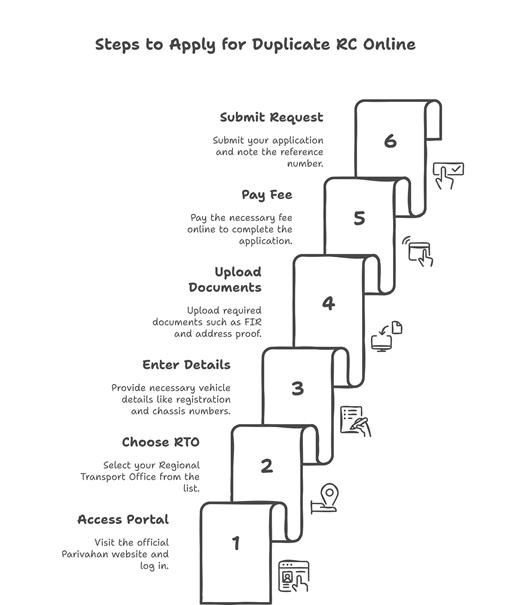
How to Apply for a Duplicate RC
Lost the original, or it's torn beyond use? Form 26 gets you a duplicate:
- Visit Parivahan and select your RTO.
- Enter registration and chassis number.
- State the reason: lost, stolen, or damaged.
- Attach an FIR if lost or stolen.
- Pay the fee, Rs 150 to Rs 2,500 depending on state and vehicle.
- Wait 7 to 15 working days.
Difference Between Physical RC and Digital RC
Neither fully replaces the other:
| Factor | Physical RC | Digital RC |
|---|---|---|
| Accessibility | Carried in the vehicle | On phone or DigiLocker, anywhere |
| Legal validity | Valid | Equally valid, Rule 139 CMVR |
| Storage | Can be lost or damaged | Backed up, hard to lose |
| Convenience | Needs to be carried physically | Always on hand with your phone |
| Reissue | Needs Form 26, days to process | Redownload instantly if details are current |
When Do You Need an RC?
An RC comes up more often than people expect:
- Buying or selling a vehicle
- Filing an insurance claim
- Applying for a Two Wheeler Loan or a car loan
- Transferring ownership
- Renewing your pollution certificate
- Routine traffic checks
Financing instead? Check Two Wheeler Loan Eligibility, compare Two Wheeler Loan Interest Rates, and run the Two Wheeler Loan EMI Calculator first.
Tips to Keep Your RC Safe
A few habits protect you here:
- Keep both copies. Physical in the vehicle, digital on your phone.
- Update your mobile number the moment it changes.
- Never share your RC PDF freely; it carries personal details.
- Re-download after any change, address or ownership transfers included.
Most of this takes five minutes once you know which app to open. What trips people up is a mobile number nobody updated.
Frequently Asked Questions
How Can I Download My RC Online?
Three ways: DigiLocker, mParivahan, or the Parivahan Sewa portal directly. Registration number goes in first, then an OTP to your registered mobile. Clears in seconds, most of the time.
How Do I Download My Vehicle RC Using the Registration Number?
That number is what the system searches the Vahan database against, so it has to match exactly, no typos. Enter it on Parivahan's RC Print page, or inside DigiLocker or mParivahan, whichever you'd rather use.
Can I Download My RC From DigiLocker?
Yes. Log in, open Issued Documents, pick Ministry of Road Transport and Highways, fetch using your registration number. Nothing to verify by hand here, it's coming straight off government records.
How Can I Download My RC From the mParivahan App?
Install it, register your number, add the vehicle. Done. It even holds a copy offline once loaded, which matters more than it sounds like it should during a traffic stop where the signal's dropped.
Is a Digital RC Legally Valid in India?
Yes. Rule 139 of the Central Motor Vehicles Rules, 1989 covers it. Pull it through DigiLocker or mParivahan and it carries the same weight as the physical card, full stop.
What Documents Are Required to Download an RC?
Barely anything. Registration number, a working mobile linked to the vehicle for the OTP, and if you're going the DigiLocker route, an Aadhaar-linked account. No uploads for a basic download.
Can I Download My RC Without an OTP?
No. Every official channel needs it, no exceptions. That step is what confirms you're actually the registered owner, or at least someone with the phone in hand.
Why Is My RC Not Available Online?
Half a dozen usual suspects: wrong mobile number on file, a typo in the registration number, a transfer still pending, the server having a bad day. Older vehicles sometimes just never got fully digitised.
How Do I Get a Duplicate RC If I Lose the Original?
Form 26, filed through Parivahan or your RTO. Lost or stolen? Attach the FIR. Pay the fee, then wait, usually 7 to 15 working days before it's ready.
Is There Any Fee to Download an RC Online?
No, the digital version through DigiLocker, mParivahan or Parivahan costs nothing. Fees only kick in for a physical duplicate, and that runs Rs 150 to Rs 2,500 depending on your state.
Can I Show a Digital RC During a Traffic Police Check?
Yes, provided it's the actual government-issued version pulled through DigiLocker or mParivahan. A screenshot of an old RC won't cut it the same way.
How Long Does It Take for a New RC to Be Available Online?
A few working days after the RTO finishes processing, generally, though it shifts by state. Give a freshly registered vehicle a little extra patience before it shows up.
What Should I Do If My RC Details Are Incorrect?
Go to your RTO with supporting documents and raise a correction. Downloading again won't fix it, the error lives in the record itself, and only the RTO can touch that.
Can I Download an RC for a Financed Vehicle?
Yes, though expect a hypothecation entry naming the lender to show up on it. Perfectly normal. It clears once the loan's closed and the lender removes it.
Is a Downloaded RC Accepted for Insurance and Loan Purposes?
Mostly, yes. Some insurers or lenders still want the physical original at final verification though, so it's worth a quick call to check before you assume the PDF alone will do.
How Can I Check My RC Status Online?
Registration number, into the Parivahan status page. Tells you whether the registration's active, whether a transfer's pending, whether the record's actually current.
Can I Download the RC PDF Multiple Times?
As many times as you want, no cap. DigiLocker, mParivahan, Parivahan directly, doesn't matter which.
What Is the Difference Between an RC and a Smart Card RC?
A smart card RC is the physical, chip-embedded card some RTOs issue. What you download online is the PDF version instead. Same information sitting in two different formats.
Can I Download the RC for a Second-Hand Vehicle?
Once the ownership transfer's actually gone through and updated at the RTO, yes. Try it too early, before that clears, and you'll just pull up the previous owner's details.
How Do I Update My Mobile Number Linked to the RC?
Application form plus ID proof, submitted at your RTO. Once it's updated, OTPs for every future download go to the new number, not whatever's sitting in the old records.
Disclaimer: The information provided in this blog post is intended for informational purposes only. The content is based on research and opinions available at the time of writing. While we strive to ensure accuracy, we do not claim to be exhaustive or definitive. Readers are advised to independently verify any details mentioned here, such as specifications, features, and availability, before making any decisions. Hero FinCorp does not take responsibility for any discrepancies, inaccuracies, or changes that may occur after the publication of this blog. The choice to rely on the information presented herein is at the reader's discretion, and we recommend consulting official sources and experts for the most up-to-date and accurate information about the featured products.